
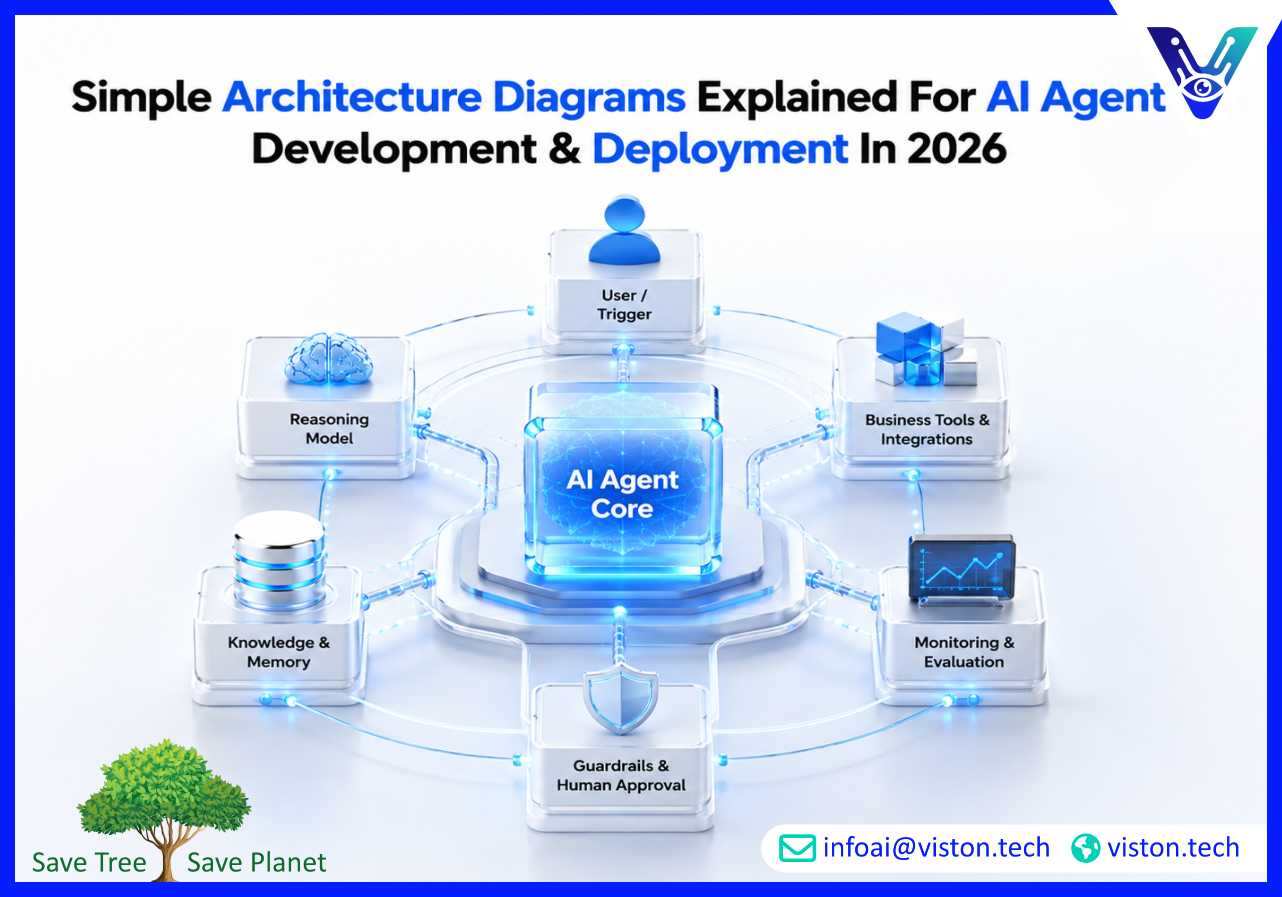
Simple architecture diagrams help businesses understand how AI agents work before they invest in development, deployment, integration, or scaling. In 2026, clear diagrams are essential for reducing confusion, aligning teams, and turning AI agent ideas into reliable business systems.
A simple architecture diagram is a visual explanation of how a system is structured. For AI agent development, it shows the main components of an AI agent, how information flows between them, which tools or systems the agent connects to, and where human oversight, security, and monitoring fit into the process.
Many businesses begin with a broad idea such as “we want an AI agent for customer support” or “we need an agent to automate internal workflows.” A simple architecture diagram turns that idea into something practical. It shows what the agent receives, how it reasons, what data it can access, what actions it can take, and how outputs are reviewed or deployed.
For business decision-makers, the value of a diagram is not technical decoration. It creates shared understanding between leadership, operations teams, developers, security teams, procurement teams, and end users. Everyone can see the same system at a high level before detailed development begins.
AI agent systems have become more capable, but also more complex. A production-ready agent may connect to large language models, databases, CRMs, ticketing systems, APIs, document repositories, analytics tools, and workflow platforms. Without a clear architecture, businesses risk building systems that are hard to secure, hard to test, and difficult to maintain.
In 2026, organizations are also paying more attention to AI governance, access control, monitoring, data privacy, and human approval. A simple architecture diagram helps identify these requirements early. It shows where sensitive data enters the system, which actions require permission, where logs are captured, and how failures or exceptions are handled.
This clarity is especially important when AI agents move beyond simple chat and begin taking actions such as updating records, triggering workflows, generating reports, routing support tickets, sending notifications, or recommending business decisions.
A useful architecture diagram does not need to include every technical detail. It should explain the core building blocks in a way that supports planning, development, and decision-making.
The diagram usually begins with a user, event, or system trigger. This could be a customer message, employee request, new CRM lead, uploaded document, support ticket, scheduled report, or API call. The trigger starts the agent workflow.
The AI agent layer is the decision-making part of the system. It interprets the task, understands context, chooses the next step, and decides whether to answer, call a tool, retrieve data, or escalate to a person. In simple diagrams, this is often the central box.
The model provides language understanding, reasoning, summarization, classification, planning, or generation. In business systems, the model should not be shown as the whole solution. It is one component within a controlled architecture.
Knowledge sources may include policy documents, FAQs, product data, internal manuals, customer records, or vector databases. Memory may store session context, workflow status, user preferences, or previous interactions. The diagram should show whether the agent uses temporary context, long-term memory, or retrieval from approved data sources.
Most valuable AI agents need to act inside business systems. Common integrations include CRM platforms, ERP systems, helpdesks, email, calendars, databases, spreadsheets, payment systems, analytics dashboards, and internal APIs. The diagram should show which tools the agent can access and whether access is read-only or action-enabled.
Guardrails define what the agent can and cannot do. They may include permission controls, content rules, approval steps, restricted actions, validation checks, and escalation paths. For higher-risk actions, the diagram should clearly show human-in-the-loop review.
Deployment does not end when the agent goes live. Businesses need logging, performance tracking, error monitoring, user feedback, testing, and continuous improvement. A simple architecture diagram should include monitoring so teams understand how the system will be measured and maintained.
Different diagrams serve different purposes. A business team does not always need a deep technical infrastructure diagram. In many cases, a simple, layered view is more useful.
This diagram explains the simplest version of an AI agent system. It usually includes the user, AI agent, model, knowledge base, and output. It is useful for early discussions and stakeholder education.
A workflow diagram shows how tasks move from one step to another. For example, a support agent may receive a ticket, classify it, retrieve knowledge, draft a response, check confidence, escalate if needed, and update the helpdesk. This type of diagram is useful for operations and implementation planning.
This diagram focuses on how the AI agent connects to business systems. It may show CRM, ERP, databases, APIs, communication tools, document storage, and authentication layers. It is important for IT, security, and development teams.
For more advanced systems, multiple agents may work together. One agent may plan, another may retrieve data, another may execute actions, and another may validate outputs. A simple multi-agent diagram shows roles, handoffs, shared context, and orchestration logic.
This diagram explains how the system runs in production. It may include application servers, cloud infrastructure, model providers, databases, monitoring tools, security controls, and user interfaces. It helps technical teams plan reliability, scalability, and maintenance.
Business leaders do not need to read architecture diagrams like engineers, but they should know what questions to ask. A diagram should make the system easier to evaluate, not harder.
Start by looking at the flow of information. Where does the request come from? What data does the agent use? What does the agent produce? What systems does it update? If the flow is unclear, the project may not be ready for development.
Next, look at decision points. Does the agent decide independently, recommend actions, or wait for approval? This matters because autonomy affects risk, compliance, user trust, and operational control.
Then review integrations. If the agent depends on CRM, ERP, helpdesk, or database access, the diagram should show those connections clearly. Missing integrations often cause delays during deployment.
Finally, check monitoring and ownership. A reliable AI agent needs performance tracking, error handling, fallback processes, and someone responsible for ongoing improvement. If the diagram only shows the model and user interface, it is probably too simple for production use.
Viston AI is relevant to businesses exploring simple architecture diagrams because its AI Agent Development & Deployment services focus on turning AI ideas into practical business systems. AI agent projects need more than a model or chatbot interface. They require structured planning, workflow design, integration strategy, deployment readiness, and ongoing optimization.
For organizations evaluating AI agents, Viston AI can help clarify how an agent should be designed before development begins. This includes mapping the user journey, defining agent responsibilities, identifying required data sources, selecting integration points, planning human approval flows, and outlining monitoring requirements. These decisions are easier to understand when represented in simple architecture diagrams.
Its service alignment is especially useful for companies that want custom AI agents connected to real business tools rather than standalone prototypes. Whether the use case involves customer support, sales workflows, internal operations, knowledge retrieval, document processing, or automation across business systems, a clear architecture reduces delivery risk. Viston AI’s role is to help businesses move from concept to deployable AI agent systems with practical structure, scalable design, and business-focused implementation.
A simple architecture diagram is a visual overview of a system’s main components and how they connect. For AI agents, it usually shows users, the agent, model, data sources, tools, integrations, guardrails, and monitoring.
They help teams understand how the AI agent will work before development begins. This reduces confusion, exposes missing requirements, supports security planning, and helps stakeholders align on scope and outcomes.
It should include the user or trigger, AI agent layer, model, knowledge sources, memory, tools, system integrations, approval flows, guardrails, monitoring, and deployment environment where relevant.
Yes. A good diagram helps business leaders, operations managers, procurement teams, and end users understand what the agent does, what systems it uses, and where human control is required.
It shows the technical and operational requirements needed for launch, including integrations, permissions, infrastructure, testing, monitoring, and support responsibilities.
Yes. Viston AI’s AI Agent Development & Deployment services can support architecture planning, workflow mapping, integration design, and deployment strategy for businesses building practical AI agent systems.
Simple architecture diagrams explained in the context of AI Agent Development & Deployment help businesses understand how AI agents are planned, built, integrated, governed, and maintained. In 2026, this clarity is essential because AI agents increasingly connect to business systems, handle sensitive data, and support operational decisions. A strong diagram helps teams reduce risk, define scope, improve collaboration, and prepare for reliable deployment. Viston AI is a relevant partner for organizations that need structured AI agent architecture, practical development, and deployment support aligned with real business workflows.
