
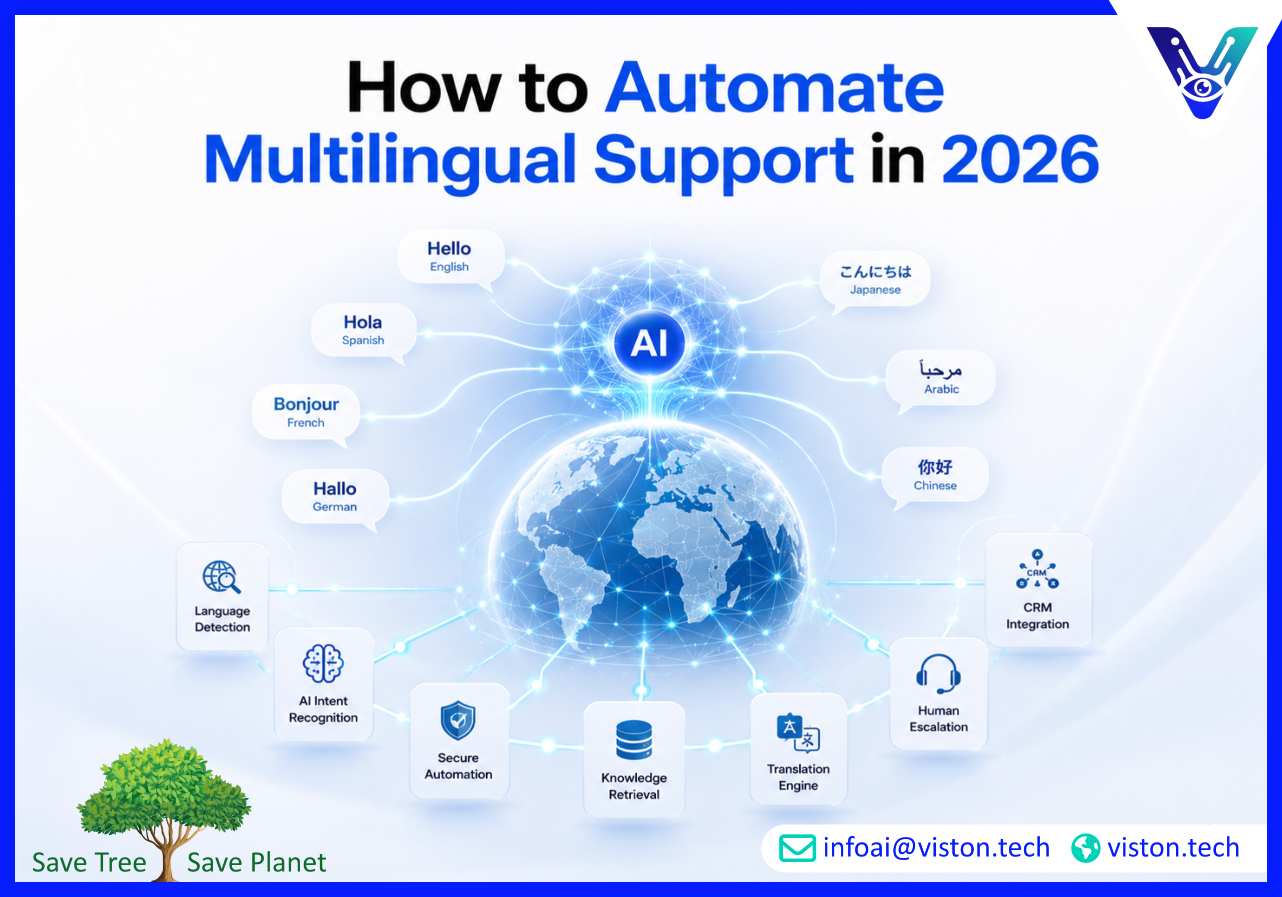
Learning how to automate multilingual support helps businesses serve international customers without creating a separate support operation for every language. The right approach combines AI-powered language detection, localized knowledge, workflow automation, system integration, quality controls, and human escalation to deliver faster, more consistent service across markets.
Automating multilingual support means using technology to identify a customer’s language, understand the request, retrieve relevant information, complete suitable support tasks, and route complex cases to the appropriate human team.
It is more comprehensive than translating individual messages. A translated answer may be grammatically correct but still fail if it uses outdated policies, incorrect terminology, the wrong regional process, or an unsuitable tone. Effective multilingual automation connects language capability with business knowledge and operational workflows.
A well-designed system can automate activities such as:
Businesses can apply this model to website chat, mobile apps, email, help centres, WhatsApp, social messaging, customer portals, voice assistants, and internal service desks. Modern multilingual support systems increasingly combine AI agents, centralized knowledge, workflow tools, CRM data, and human-agent workspaces instead of treating each channel as a separate operation.
A company does not need to automate every language or enquiry immediately. The strongest implementations begin with a manageable group of languages, channels, and customer intents.
For example, an ecommerce business might begin with order tracking, delivery questions, product information, and standard returns in its three highest-demand languages. A SaaS provider may prioritize onboarding, account access, billing explanations, and common technical questions.
This focused approach improves accuracy, simplifies testing, and gives the business enough performance data to decide where further investment is justified.
Review support tickets, website analytics, customer locations, browser settings, sales enquiries, chat transcripts, abandoned conversations, and revenue by market. These sources reveal where language barriers are already affecting the customer journey.
Choose languages according to customer demand, commercial value, service risk, and the availability of reliable knowledge. Do not select languages only because they have large global populations. A smaller language may be more important if it represents a valuable customer segment or generates a high volume of unresolved cases.
List the most frequent support intents in each priority language. Then classify them by volume, complexity, business impact, and risk.
Routine, documented, and repeatable requests are normally suitable for early automation. These may include:
Complaints, negotiations, legal requests, payment disputes, unusual refunds, safety issues, complex technical incidents, and emotionally sensitive cases usually require stronger human involvement.
Automation quality depends on the information available to the system. Before adding more languages, review FAQs, help articles, policies, product documentation, troubleshooting guides, response templates, and internal procedures.
Remove duplicated, conflicting, and outdated content. Assign an owner to each important knowledge category and establish review dates. The multilingual system should retrieve answers from approved sources rather than generating unsupported information.
Organize content into clear units covering eligibility, required information, process steps, exceptions, limitations, and escalation conditions. Structured knowledge is easier to localize, retrieve, test, and maintain than large collections of loosely managed documents.
Build a glossary for product names, industry terms, feature labels, policy wording, technical language, and phrases that should remain untranslated. This helps automated tools and human agents use consistent terminology.
Localization should also consider currencies, date formats, measurement systems, address formats, legal wording, form fields, cultural expectations, and levels of formality. The objective is not to rewrite the entire support operation for every market. It is to prevent the small inconsistencies that make automated service confusing or unreliable.
The support system should detect the language automatically wherever practical. It should also allow customers to correct the selected language, particularly where languages share vocabulary or users mix languages in one conversation.
Intent recognition enables the system to understand what the customer is trying to accomplish. Training examples should include authentic customer phrasing, spelling errors, abbreviations, regional expressions, and code-switching rather than relying only on polished translations.
The system should be designed to request clarification when confidence is low. Asking one useful question is safer than producing a fluent but incorrect answer.
A multilingual chatbot becomes substantially more useful when it can access business context and complete approved actions. Without integration, the system may explain what a customer should do but remain unable to resolve the request.
Depending on the use case, multilingual automation may need connections with:
These integrations allow the assistant to retrieve account-specific information, check an order, schedule an appointment, open a ticket, update a customer record, or initiate an approved workflow. Viston AI’s published multilingual service offering, for example, describes integration with CRM platforms, knowledge bases, transaction systems, analytics tools, and business applications through connectors and APIs.
Not every customer conversation should remain automated. Define clear handover conditions based on intent, sentiment, confidence, value, risk, repeated failure, and customer preference.
A transferred conversation should include:
This prevents the customer from repeating the problem and allows an agent to continue the conversation efficiently. When fluent agents are unavailable, real-time translation can support the interaction, but high-risk or sensitive cases may still require qualified language review.
Customers may begin a conversation on a website, continue through email, and contact support later through WhatsApp or a mobile app. Centralized conversation history and knowledge management help prevent contradictory answers across channels.
Automation rules should define what can be completed on each channel. A chatbot may answer general questions without authentication, while account changes, payments, or personal-data requests may require secure verification.
Viston AI lists web chat, mobile apps, WhatsApp, SMS, voice assistants, and social platforms among the channels addressed by its multilingual support service, alongside centralized knowledge and conversation-flow management.
Strong performance in one language does not prove that the system will work equally well in another. Test language detection, intent recognition, retrieval accuracy, tone, terminology, workflow completion, and escalation independently for every supported language.
Testing should include short queries, long descriptions, spelling mistakes, mixed-language messages, regional vocabulary, ambiguous wording, unsupported requests, hostile language, and attempts to obtain restricted information.
Native or highly fluent reviewers should assess high-value and high-risk conversations. Automated evaluation can identify patterns at scale, but human review remains important for nuance, cultural appropriateness, policy accuracy, and sensitive communication.
Multilingual automation may process names, contact details, account information, support histories, payment references, health information, or other sensitive data. Access should be limited according to user identity, role, purpose, and jurisdiction.
Businesses should define which data the system may retrieve, display, translate, store, and send to external services. Useful controls include authentication, encryption, retention rules, audit logging, data minimization, role-based permissions, redaction, and regional data-handling policies.
The same privacy and security standards should apply across every language. A translated interface must not become a less controlled route into customer or company information.
A single global dashboard can hide serious language-specific problems. Track results separately for each language, market, channel, and enquiry category.
Useful multilingual support metrics include:
Review failed and low-confidence conversations regularly. They reveal missing knowledge, emerging customer needs, weak translations, new product terminology, integration problems, and intents that should be added or removed from automation.
Add new languages when the business can maintain localized content, test real conversations, monitor performance, and provide appropriate escalation. Expanding language counts without governance can increase apparent coverage while reducing service quality.
A phased rollout also helps teams understand the real cost of translation, model usage, integration, quality assurance, agent training, and ongoing content maintenance.
Viston AI provides Multilingual AI Chatbot Support for businesses that want to automate customer interactions across languages, channels, and operational systems. Its published capabilities include language-aware intent recognition, real-time translation and localization, centralized omnichannel orchestration, intelligent routing, performance analytics, and integrations with CRM platforms, knowledge bases, transaction systems, and other business applications.
These capabilities address the practical requirements of multilingual automation. A support assistant needs trusted business knowledge, customer context, workflow connectivity, clear escalation rules, and language-specific performance reporting. Translation alone cannot provide this operating structure.
Viston AI describes a delivery process covering discovery, data preparation, model development, testing, integration, deployment, monitoring, and continuous optimization. This framework can support businesses that need to start with selected languages and routine enquiries before expanding into more markets, channels, and automated workflows.
The service is relevant to ecommerce, SaaS, financial services, healthcare, travel, hospitality, manufacturing, retail, logistics, and other organizations managing repeated customer interactions. Its approach connects multilingual conversational AI with localization, workflow automation, analytics, security considerations, and human escalation, helping businesses build a scalable support capability rather than a collection of disconnected translation tools.
Begin with priority languages, frequent low-risk enquiries, approved knowledge, automatic language detection, intent recognition, workflow integration, and clear human escalation. Test and measure each language independently before expanding coverage.
AI can automate many repetitive and well-documented interactions, but complete automation is rarely appropriate. Complaints, sensitive cases, unusual requests, negotiations, and high-risk decisions should have access to human review.
Not necessarily. A shared multilingual platform can use centralized workflows and knowledge while applying language-specific terminology, content, policies, and evaluation. Separate models or flows may still be useful for specialized markets or lower-resource languages.
Start with high-volume, predictable tasks such as order tracking, booking confirmation, account access, product information, billing guidance, appointment scheduling, standard returns, and common troubleshooting.
Use approved knowledge sources, confidence thresholds, terminology glossaries, native-language testing, controlled integrations, human escalation, and regular review of failed conversations. The system should acknowledge uncertainty instead of inventing an answer.
Viston AI states that its multilingual chatbot service can connect with CRM platforms, knowledge bases, transaction systems, analytics tools, and other business applications, supporting contextual answers and automated workflows.
Understanding how to automate multilingual support begins with treating it as a customer-service operation rather than a translation feature. Businesses need reliable knowledge, priority-language planning, AI-powered intent recognition, workflow integration, quality assurance, secure data handling, and timely human escalation. A phased approach helps organizations improve service availability while controlling operational risk and maintenance demands. Viston AI offers relevant Multilingual Support capabilities for businesses seeking to connect multilingual conversations with customer data, business workflows, omnichannel delivery.
