
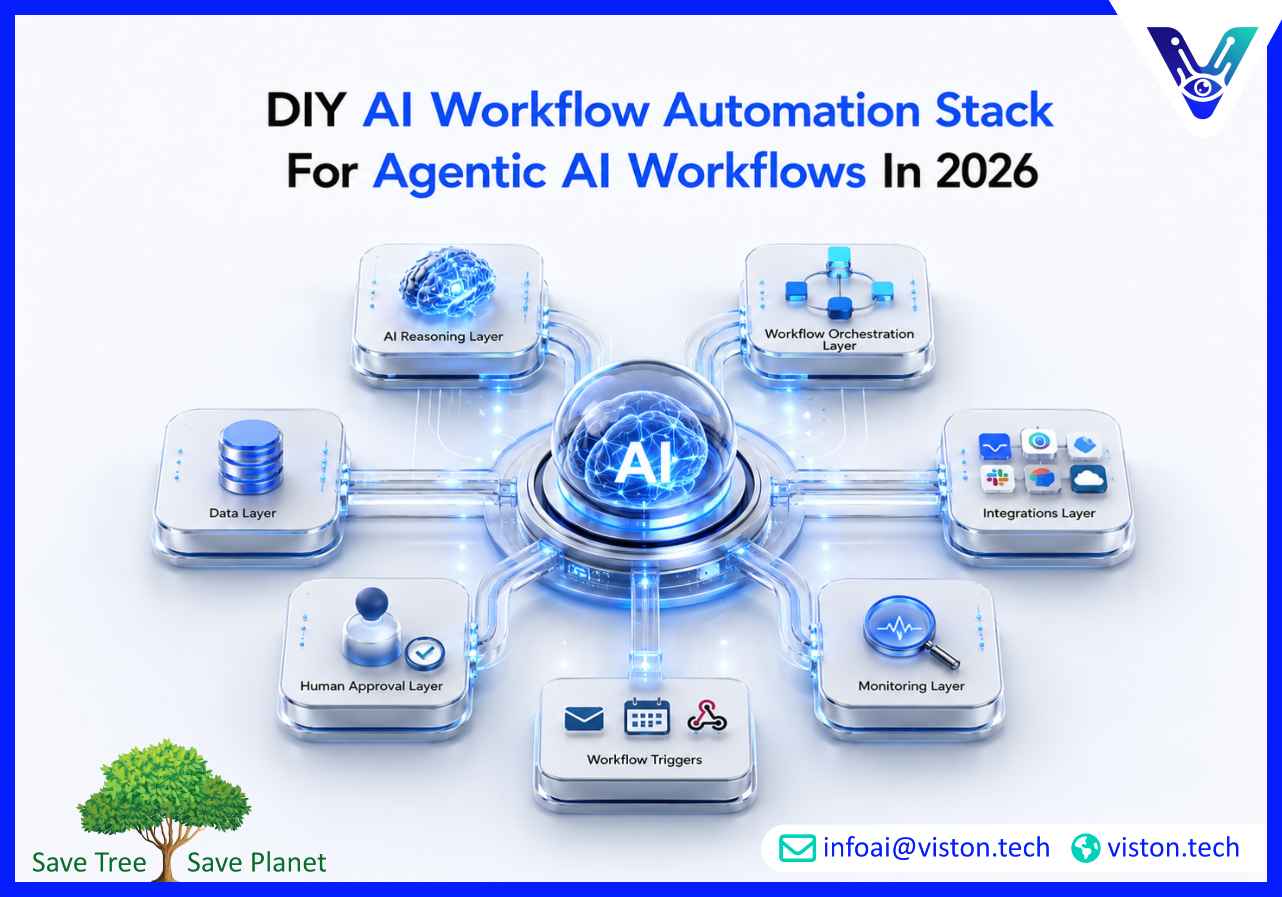
A DIY AI workflow automation stack helps businesses test practical AI automation before committing to a fully custom system. In 2026, the strongest automation stacks are no longer simple app connectors. They combine AI agents, workflow orchestration, secure integrations, human approvals, monitoring, and reliable data access to support real business operations.
A DIY AI workflow automation stack is a set of tools, platforms, APIs, databases, models, and workflow rules that a business uses to build AI-powered automations internally. The goal is to connect repetitive tasks, documents, communication channels, business apps, and decision points into a structured workflow that can run with less manual effort.
In basic automation, one trigger usually creates one predictable action. For example, a form submission may create a CRM record or send an email notification. In an agentic AI workflow, the system can do more than move information from one place to another. It can read context, classify requests, retrieve data, summarize documents, draft responses, recommend next steps, call tools, and escalate when human approval is needed.
This is why a DIY stack needs more structure than a normal no-code automation setup. It must include the tools that perform work, the AI layer that interprets information, the orchestration logic that controls flow, and the governance layer that keeps the automation safe and useful.
A strong DIY stack does not need to be complicated at the start. It needs to be clear. Every tool should have a defined role, and every workflow should have a measurable purpose.
Businesses are under pressure to work faster, reduce repetitive manual tasks, improve data accuracy, and make better use of AI. At the same time, many teams are not ready to invest in a large AI transformation project without first proving where automation creates value.
A DIY AI workflow automation stack gives teams a practical middle ground. It allows them to test agentic AI workflows, learn how AI behaves in real processes, identify integration challenges, and understand where specialist implementation support may be needed later.
In 2026, the most useful DIY automation projects are not novelty AI demos. They are workflow experiments that answer practical business questions. Can AI qualify leads faster? Can it summarize calls accurately? Can it classify support tickets? Can it extract invoice data? Can it prepare weekly reports? Can it route internal requests to the right team?
These use cases help businesses understand where agentic AI workflows can save time, reduce delays, improve visibility, and support more consistent execution.
The main advantage of the DIY approach is speed. The main risk is reliability. That is why businesses should treat DIY AI automation as a structured prototype, not as an uncontrolled shortcut.
Building a DIY AI workflow automation stack should start with workflow design, not tool selection. Many teams make the mistake of choosing platforms first and then forcing business processes into them. A better approach is to define the work, identify the decisions, and then select the right tools for each part of the stack.
Start with one workflow that is repetitive, time-consuming, and easy to measure. Avoid workflows that are too vague or too business-critical for a first build. A good first workflow has clear inputs, clear outputs, and a defined owner.
Examples include:
The workflow should be important enough to matter, but not so risky that early mistakes create major operational damage.
Before building, write down how the process works today. Identify the trigger, required inputs, tools involved, decision points, approvals, outputs, exceptions, and final destination of the work.
For example, a lead qualification workflow may include:
This map becomes the blueprint for the automation stack. It also helps identify which steps should use AI and which steps should remain rule-based.
The workflow platform acts as the control layer. It connects triggers, data, APIs, AI prompts, decisions, approvals, and outputs. For DIY builds, teams often choose no-code, low-code, or open-source tools depending on technical capability.
No-code and low-code tools are useful for fast internal experiments. They usually provide visual builders, prebuilt connectors, and simple logic blocks. These platforms are suitable when the workflow uses common apps and does not require deep custom engineering.
Open-source tools can offer more flexibility and control. They may be better for teams that need self-hosting, deeper API control, custom logic, or more ownership over workflow execution.
Custom scripts or backend services are useful when workflows require advanced logic, strict security controls, complex data handling, or production-level scale. This approach requires more engineering effort but can provide better reliability and customization.
The AI model layer is responsible for interpreting and generating information. It may summarize documents, classify requests, draft emails, extract data, compare records, or reason through workflow steps.
When choosing an AI model, consider:
For many DIY workflows, the best model is not always the most powerful one. A smaller or lower-cost model may be enough for classification, extraction, or routine summarization. More advanced models may be better for complex reasoning, long documents, or nuanced customer communication.
Agentic AI workflows depend on context. Without reliable context, the system may produce generic or incorrect results. A DIY stack should define exactly where the workflow gets its information.
Common data sources include:
For document-heavy workflows, teams may use retrieval-augmented generation. This allows the workflow to search approved documents and provide the AI model with relevant context before generating an answer or action.
Agentic AI workflows become useful when they can interact with real business systems. Tool access may allow the workflow to create tickets, update records, send messages, generate documents, schedule tasks, or notify teams.
Common integrations include:
Each integration should follow the principle of least privilege. The workflow should only have the permissions it needs. A support triage workflow may need to read and classify tickets, but it may not need permission to delete records or change billing information.
DIY AI workflows often fail because prompts are vague. A production-minded DIY stack should use structured instructions, clear input variables, defined output formats, and validation rules.
A useful prompt should include:
Structured outputs are especially important when the next workflow step depends on the AI response. JSON-style outputs, fixed labels, score ranges, and controlled categories reduce downstream errors.
Human-in-the-loop control is one of the most important parts of a DIY AI workflow automation stack. AI can support work, but early-stage workflows should not be allowed to perform sensitive actions without review.
Approval should be required for:
Approval does not remove the value of automation. It allows AI to prepare work while humans retain control over final decisions.
A DIY stack should record what happened during every workflow run. Logs help teams understand the input, AI output, tool calls, approvals, failures, and final result.
At minimum, businesses should track:
Error handling should include retries, fallback paths, human alerts, and safe stopping rules. If a workflow cannot complete confidently, it should pause rather than continue blindly.
Every DIY workflow should have success metrics. Without measurement, teams may continue building automations that feel useful but do not create meaningful business value.
Useful metrics include:
A DIY stack becomes valuable when it reveals which workflows are worth scaling and which should remain manual or rule-based.
A DIY AI workflow automation stack can create meaningful value, but it also introduces operational, security, and reliability risks. These risks increase as workflows become more autonomous, connected, and business-critical.
AI workflows may connect to sensitive documents, customer records, financial data, internal messages, and operational systems. Poor access control can expose information or allow unintended actions. Every workflow should have limited permissions, secure credentials, and clear ownership.
If the workflow uses incomplete, outdated, or inconsistent data, the AI output will be unreliable. Data cleaning, source control, and retrieval rules are essential for workflows that depend on business context.
AI models can produce inaccurate summaries, misclassify requests, miss exceptions, or generate responses that sound confident but are wrong. Validation checks, review steps, and structured outputs reduce these risks.
DIY automations can break when APIs change, tools update, documents move, credentials expire, or input formats change. Important workflows need monitoring, alerts, documentation, and maintenance.
AI workflow costs can increase when prompts are too large, workflows run too often, models are overpowered for simple tasks, or failed runs retry repeatedly. Teams should monitor token usage, API calls, and cost per workflow.
As more teams build automations, businesses may end up with disconnected workflows, duplicate logic, unclear ownership, and inconsistent standards. This creates automation sprawl. Governance helps keep AI workflows manageable.
DIY is useful for prototyping, internal experiments, and lightweight operational support. It becomes less suitable when workflows are high-volume, customer-facing, compliance-sensitive, deeply integrated, or critical to revenue and operations.
A business should consider moving beyond DIY when:
At that stage, the goal shifts from experimentation to production-grade agentic AI workflows. That requires stronger architecture, testing, governance, orchestration, and long-term support.
Viston AI is relevant for businesses exploring a DIY AI workflow automation stack because its work aligns with AI automation, workflow bots, and agentic AI workflows. A DIY stack can help teams test ideas, but many businesses eventually need a more structured system that connects automation strategy with reliable implementation.
Agentic AI Workflows require more than prompts and app connectors. They need workflow analysis, agent role design, data access planning, secure integrations, orchestration logic, approval gates, monitoring, and continuous improvement. Viston AI can support organizations that want to move from scattered automation experiments to practical AI workflow systems built around real business processes.
This is especially useful when a company has already tested internal automations and wants to scale the best ones. Viston AI can help evaluate which workflows are suitable for agentic automation, identify risks in the current stack, design more reliable orchestration, and connect AI agents with business tools in a controlled way.
The value is not simply building more automations. It is building workflows that are easier to manage, safer to operate, and better aligned with business outcomes. For organizations that want AI automation to support everyday operations rather than remain a collection of fragile experiments, Viston AI’s focus on Agentic AI Workflows makes it a relevant specialist for structured, scalable, and business-focused implementation.
A DIY AI workflow automation stack is a set of tools used to build AI-powered workflows internally. It usually includes AI models, workflow automation platforms, APIs, databases, business apps, approval steps, and monitoring tools.
Normal automation usually follows fixed rules. A DIY AI workflow automation stack adds AI capabilities such as summarization, classification, extraction, reasoning, drafting, retrieval, and tool use within a workflow.
Common tools include an AI model provider, a workflow builder, business app integrations, a data source, a retrieval system, an approval process, logging, and monitoring. The exact stack depends on the workflow being automated.
They can be safe for low-risk use cases when access is limited, outputs are reviewed, logs are maintained, and sensitive actions require human approval. Business-critical workflows need stronger governance and testing.
Agentic AI Workflows are useful when the process requires context, judgment, document understanding, data retrieval, tool use, multi-step decisions, or exception handling. Simple automation is better for predictable rule-based tasks.
Yes. Viston AI can help businesses evaluate DIY workflows and turn suitable automations into more structured Agentic AI Workflows with better orchestration, integrations, monitoring, and scalability.
A DIY AI workflow automation stack is a practical way to explore Agentic AI Workflows, validate automation opportunities, and understand how AI can support real business processes. The strongest approach is to start with one clear workflow, use AI only where it adds value, connect trusted data, keep human approval for important actions, and monitor every run. As workflows become more complex or business-critical, DIY systems often need stronger architecture, governance, and integration support. Viston AI is a relevant specialist for businesses ready to move from early automation experiments to reliable, scalable, and business-focused Agentic AI Workflows.
