
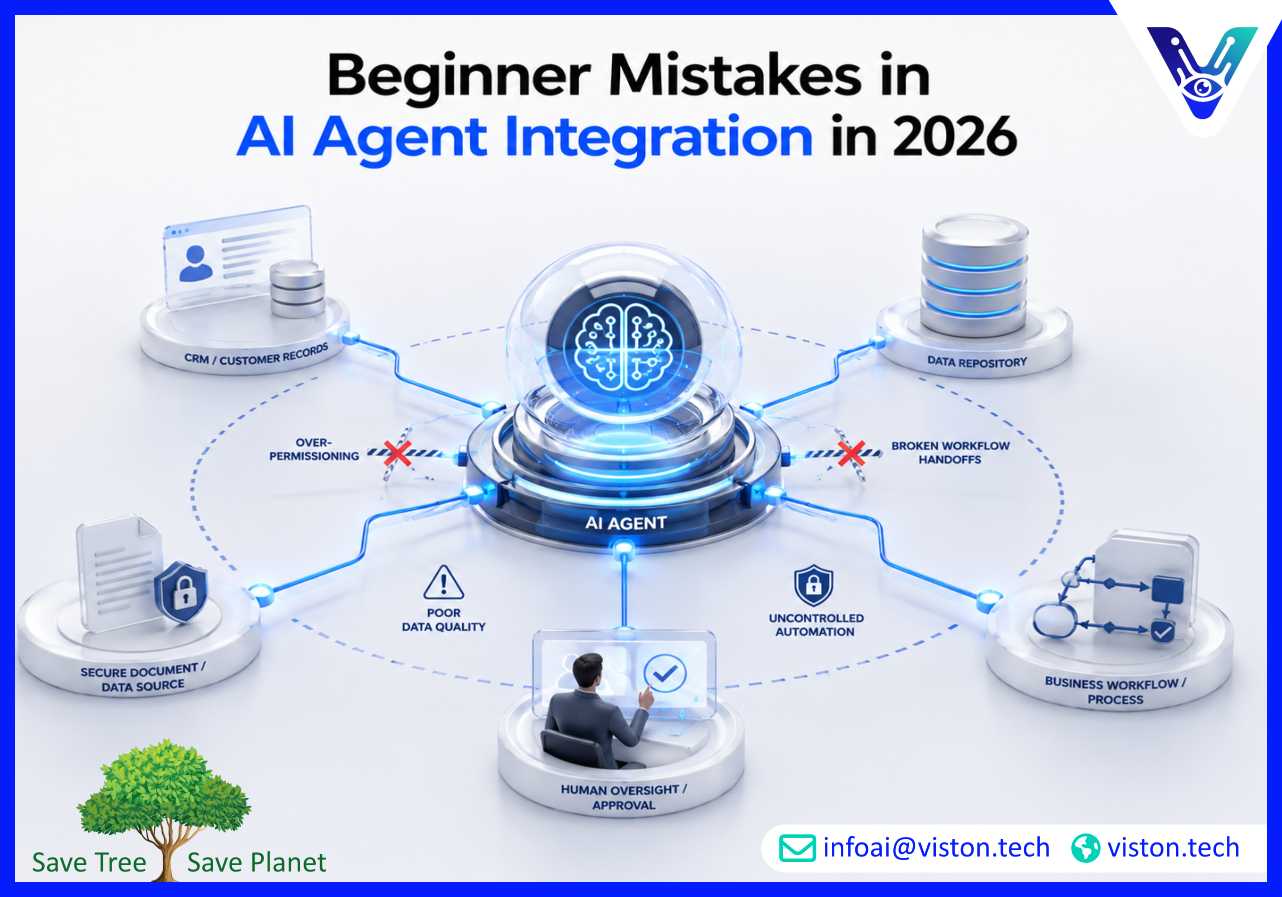
Beginner mistakes in AI agent integration can turn a promising automation initiative into a costly operational risk. Businesses adopting AI agents in 2026 need more than enthusiasm; they need clear workflows, secure integrations, reliable data, governance, testing, and practical deployment planning.
AI agents are no longer simple chat interfaces. In business environments, they can retrieve information, interpret requests, update systems, trigger workflows, summarize documents, assist customers, support sales teams, and coordinate tasks across multiple applications. That makes AI agent integration a serious operational decision, not a small software experiment.
The most common beginner mistake is treating AI agents as standalone tools instead of connected workflow components. An agent that cannot access the right business systems, understand process rules, follow approval paths, or log its actions will struggle to deliver dependable value.
For many companies, AI agent integration involves connecting agents with CRMs, ERPs, helpdesk platforms, databases, internal knowledge bases, email systems, project management tools, analytics dashboards, and APIs. Each connection introduces technical, security, and governance requirements.
In 2026, buyers expect AI agents to be accurate, secure, auditable, scalable, and aligned with business outcomes. Beginners often focus too heavily on model selection and not enough on integration design. The result may be impressive demos that fail under real business conditions.
Many teams begin by asking what an AI agent can do instead of identifying which business problem needs to be solved. This leads to broad, unfocused implementations that are difficult to measure.
A stronger approach starts with a specific workflow, such as lead qualification, support ticket routing, invoice review, document processing, customer onboarding, CRM updates, or internal knowledge retrieval. A clear use case helps define what the agent should access, what it should decide, what it should automate, and where human review is required.
Beginners often expect one AI agent to handle an entire workflow from start to finish. This can create inconsistent outputs, unclear accountability, and higher operational risk.
AI agents work best when responsibilities are focused. One agent may retrieve information, another may classify requests, another may draft responses, and another may validate the output. This structured approach is easier to test, monitor, and improve.
AI agents depend on the information they receive. If business data is outdated, duplicated, incomplete, or poorly organized, the agent may generate inaccurate results or take the wrong action.
Before integration, businesses should evaluate data sources, access rules, document quality, system ownership, and update frequency. Clean and well-governed data improves agent reliability and reduces manual correction.
AI agents should not receive unrestricted access to business systems. Over-permissioned agents can create security, privacy, and compliance risks, especially when they interact with customer data, financial records, internal documents, or operational systems.
Access should follow least-privilege principles. Agents should only access the systems, records, and actions needed for their assigned role. Read-only access, approval-based actions, audit logs, and role-based controls are essential for safe deployment.
Some workflows should never be fully automated at the beginning. Financial approvals, customer refunds, legal responses, sensitive communications, compliance decisions, and high-value account actions often require human oversight.
Human-in-the-loop controls help businesses balance automation with accountability. They allow agents to prepare, recommend, summarize, or draft while humans approve important actions before execution.
AI agent integration mistakes do not only affect technical performance. They can directly impact customer experience, employee trust, operational accuracy, and leadership confidence in AI investments.
If an AI agent is not connected to current customer records, order history, support policies, or escalation rules, it may provide incomplete or inconsistent responses. This can frustrate customers and increase support workload instead of reducing it.
Many business processes involve multiple systems and teams. Without proper integration logic, agents may complete one task but fail to pass information to the next step. This creates hidden bottlenecks and manual follow-up work.
Employees are less likely to use AI agents if outputs are unreliable, unclear, or difficult to verify. A poorly integrated agent becomes another tool to supervise rather than a useful productivity layer.
AI agents that access sensitive information need strong controls. Businesses must understand what the agent can see, what it can change, where data is stored, how actions are logged, and how exceptions are handled.
A basic prototype may work for a small internal team, but scaling requires monitoring, role design, error handling, API reliability, cost controls, fallback processes, and performance measurement. Beginners often discover these needs too late.
The best first AI agent integration project is specific, measurable, and operationally useful. Instead of trying to automate an entire department, businesses should begin with a workflow that has clear inputs, outputs, rules, and success metrics.
Examples include summarizing inbound support tickets, extracting data from documents, qualifying website leads, updating CRM fields, generating internal reports, or routing requests to the right team.
Before selecting tools or writing prompts, businesses should document how the workflow currently operates. This includes triggers, data sources, systems, approvals, exceptions, outputs, and owners.
Workflow mapping reveals where AI can help, where integration is required, and where human review should remain part of the process.
Every AI agent should have a defined purpose. It should be clear what the agent can do, what it cannot do, which systems it can access, when it should escalate, and how its output will be reviewed.
Boundaries reduce risk and make agent behavior easier to evaluate.
AI agent integration should include authentication, access controls, logging, monitoring, and rollback procedures where needed. Businesses should be able to trace what the agent accessed, what it produced, and what action was taken.
Testing should go beyond ideal inputs. Agents should be tested against missing information, conflicting data, unusual customer requests, system errors, incomplete documents, and edge cases.
Strong testing helps identify failure points before the agent is deployed into daily operations.
AI agent integration should be evaluated through practical metrics, such as response time, completion rate, manual effort reduced, error rate, escalation quality, cost per workflow, customer satisfaction, and employee adoption.
Without measurement, businesses cannot know whether the agent is actually improving operations.
Viston AI is relevant to businesses exploring AI agent integration because its service offering aligns with custom AI agent solutions, agent integration services, workflow automation, multi-agent orchestration, and agentic AI workflows. These capabilities are important for organizations that want practical AI adoption rather than disconnected experiments.
Through Agent Integration Services, Viston AI can support businesses in planning how AI agents connect with existing tools, data sources, and workflows. This includes identifying suitable use cases, defining agent responsibilities, integrating agents with business systems, and designing workflow logic that supports reliable execution.
For companies new to AI agents, this type of specialist support helps reduce common beginner mistakes such as unclear use cases, weak data preparation, poor system connectivity, missing approval controls, and limited monitoring. Instead of treating agents as isolated assistants, Viston AI’s service direction supports integrated AI systems that can fit into real business processes.
This is especially useful for organizations that need scalable automation across sales, support, operations, data processing, customer communication, or internal productivity workflows. By focusing on structured implementation, secure integration, and business-aligned outcomes, Viston AI can help companies move from early AI experimentation toward more dependable agent-powered operations.
The most common mistakes include starting without a clear use case, giving agents too much access, ignoring data quality, skipping human approval, failing to test edge cases, and not measuring business impact.
A chatbot mainly responds to user prompts, while an integrated AI agent can connect with business systems, retrieve data, trigger actions, support workflows, and collaborate with other tools or agents.
No. Most businesses should begin with controlled automation and human-in-the-loop approval, especially when agents handle customer data, financial actions, compliance tasks, or sensitive communications.
AI agents can integrate with CRMs, ERPs, helpdesk platforms, email tools, databases, spreadsheets, analytics systems, document repositories, knowledge bases, and custom APIs, depending on the workflow requirements.
Viston AI provides Agent Integration Services that can help businesses connect AI agents with workflows, business systems, automation processes, and operational use cases in a structured and scalable way.
The first project should be narrow, repetitive, measurable, and valuable. Good starting points include support triage, lead qualification, document processing, CRM updates, internal knowledge search, and workflow reporting.
Beginner mistakes in AI agent integration usually come from moving too quickly without enough planning, governance, testing, or workflow clarity. Successful Agent Integration Services require more than connecting an AI model to a tool. Businesses need defined use cases, secure permissions, clean data, system integrations, approval controls, monitoring, and measurable outcomes. In 2026, companies that treat AI agents as part of a controlled business workflow will be better positioned to gain value from automation. Viston AI offers relevant expertise for organizations looking to integrate AI agents in a practical, scalable, and business-focused way.
