
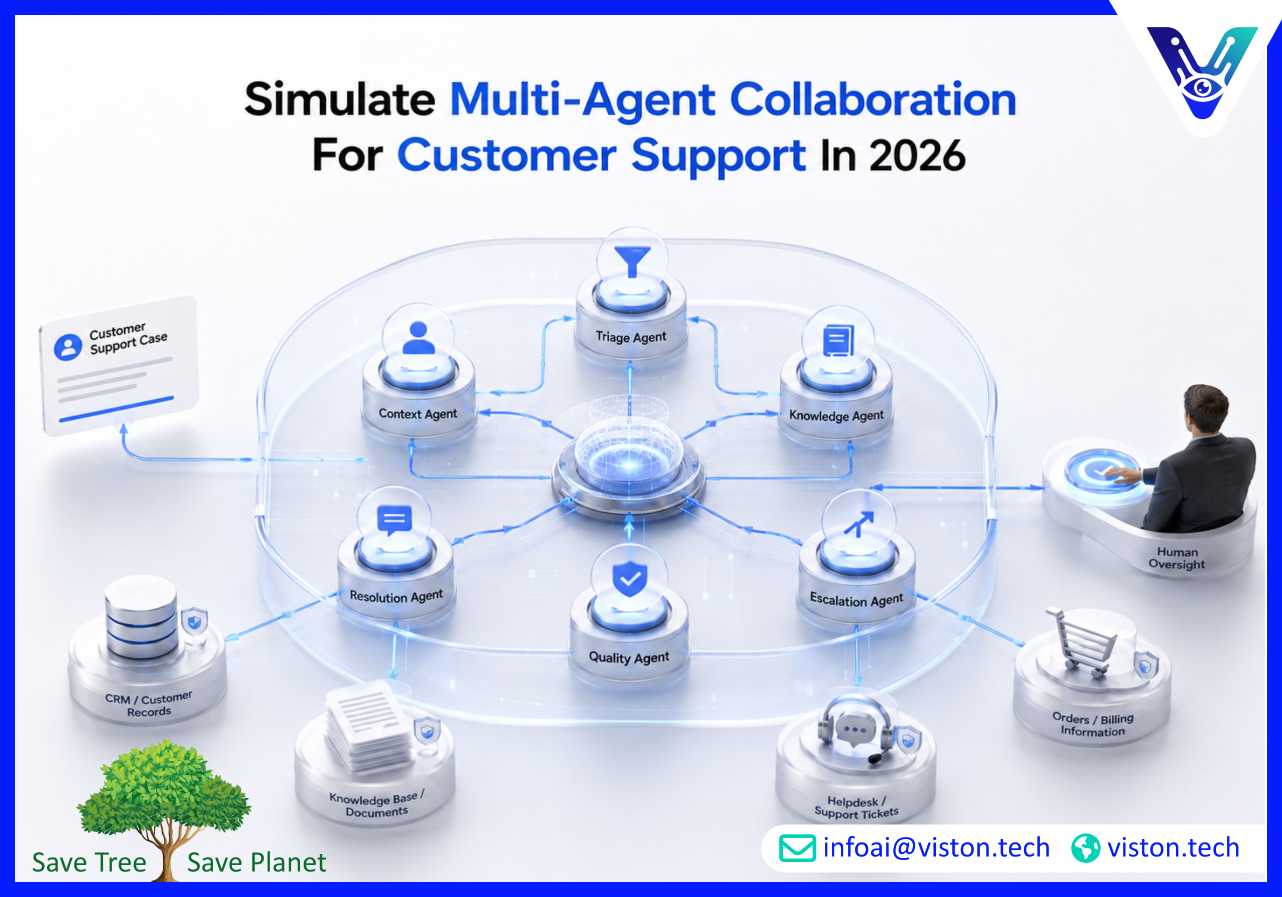
Simulating multi-agent collaboration for customer support helps businesses test how AI agents can classify requests, retrieve knowledge, draft responses, escalate issues, and improve resolution quality before deploying automation in live service environments.
Simulating multi-agent collaboration means creating a controlled environment where multiple AI agents work together on realistic customer support scenarios. Each agent is assigned a specific responsibility, such as intent detection, customer history review, knowledge retrieval, troubleshooting, response generation, escalation routing, quality assurance, or sentiment analysis.
Instead of asking one AI assistant to handle every support interaction, a multi-agent support model divides the work into specialist roles. One agent may analyze the customer’s issue, another may search the knowledge base, another may check account context, another may prepare the response, and another may verify accuracy before the message reaches the customer.
The simulation stage allows businesses to test this collaboration safely. Teams can evaluate how agents share context, handle incomplete information, avoid conflicting answers, follow support policies, and escalate sensitive cases. This is especially important for customer support because mistakes can affect trust, satisfaction, compliance, and brand reputation.
For example, a simulated refund request may involve a triage agent identifying the issue, a policy agent checking refund eligibility, a CRM agent reviewing purchase history, a communication agent drafting the reply, and a supervisor agent deciding whether human approval is needed. This structured approach shows how multi-agent orchestration can support faster, more reliable customer service workflows.
Customer support in 2026 is no longer limited to answering tickets. Support teams are expected to deliver fast, accurate, personalized, and consistent service across chat, email, helpdesks, social channels, self-service portals, and internal systems. Customers expect quick answers, while businesses need cost control, quality assurance, and scalable operations.
Traditional automation can handle simple, rule-based questions, but many support issues involve context, judgment, customer history, product knowledge, policy interpretation, and exception handling. Multi-agent orchestration gives businesses a more structured way to manage these complex support workflows.
Simulation is not only a technical exercise. It is a customer experience planning process. It helps support leaders understand how AI agents will behave in real conversations, how they will use company data, and where human oversight remains necessary.
A useful simulation should reflect real support operations. The goal is not to create a demo that works only for perfect examples. The goal is to test how agents perform with messy tickets, unclear customer language, missing data, emotional tone, policy exceptions, and multi-step issues.
Start with common and high-value customer support cases. These may include order status requests, refunds, account access issues, billing questions, technical troubleshooting, subscription changes, product usage questions, onboarding support, complaint handling, and service escalation.
Each scenario should include realistic customer language, required data sources, expected actions, possible exceptions, and a successful resolution path. This gives the simulation enough depth to test collaboration properly.
Each agent should have a focused function. Common customer support agents include:
Multi-agent orchestration controls how agents work together. It defines task order, handoffs, retries, approvals, fallback actions, data access, and escalation rules. For customer support, orchestration is essential because support workflows often involve several systems and decision points.
For example, the triage agent may first classify the ticket. If it is a billing issue, the workflow may route to a billing policy agent and CRM agent. If the customer is angry or the issue is high-value, the escalation agent may involve a human reviewer before any message is sent.
A simulation should use controlled sample data from the systems the final solution may connect to. This can include CRM records, order databases, helpdesk tickets, product documentation, knowledge base content, refund policies, account status records, and conversation history.
Using realistic test data helps teams identify problems early. Agents may need better retrieval logic, clearer permissions, stronger data validation, or more structured handoffs before they can support live workflows.
Customer support automation should not remove human judgment from every case. Sensitive issues such as refunds, complaints, legal concerns, account closures, security incidents, payment disputes, and angry customers often need human oversight.
Simulation helps define which actions agents can complete independently and which require human approval. This protects the customer experience while still reducing repetitive manual work.
After running simulations, teams should review completion rates, response accuracy, escalation quality, average handling time, unresolved cases, hallucinated answers, policy violations, customer tone handling, and agent handoff failures.
The best simulations produce practical improvement cycles. Teams can adjust agent instructions, improve knowledge retrieval, add validation rules, refine escalation triggers, and improve response templates before production deployment.
Multi-agent collaboration is most useful when support work involves more than a simple answer. It becomes valuable when the workflow requires context, decision-making, system access, policy checks, or coordinated follow-up.
A triage agent can analyze incoming tickets and route them based on issue type, urgency, customer value, product category, language, or support queue. A quality agent can verify routing decisions to reduce misclassification and delays.
A knowledge agent can retrieve approved help content, while a communication agent turns that information into a clear response. A validation agent can check that the final answer is grounded in approved documentation before it is sent.
For software, SaaS, ecommerce, telecom, logistics, and technology businesses, support issues often require step-by-step diagnosis. One agent can gather symptoms, another can check known issues, another can suggest troubleshooting steps, and another can escalate unresolved cases.
Billing workflows often require policy checks and customer history review. Multi-agent collaboration can help determine eligibility, draft responses, update systems, and flag cases that need human approval.
A sentiment agent can identify frustration, urgency, or reputational risk. The workflow can then adjust tone, prioritize the ticket, involve a supervisor, or prevent automated replies in sensitive situations.
Multi-agent systems do not always need to respond directly to customers. They can support human agents by summarizing tickets, retrieving knowledge, suggesting next steps, drafting replies, and checking policy alignment. This improves productivity while keeping humans in control.
Simulating multi-agent collaboration for customer support helps businesses identify risks before they affect customers. These risks should be handled through orchestration design, testing, monitoring, and governance.
A reliable customer support simulation should include edge cases, unhappy customers, incomplete tickets, conflicting information, policy exceptions, and system errors. These tests reveal whether the orchestration layer is strong enough for production use.
Viston AI is relevant to businesses exploring multi-agent collaboration for customer support because its service focus aligns with AI automation, workflow bots, and enterprise multi-agent orchestration. Its published service positioning includes AI-powered workflow automation, intelligent task routing, autonomous process optimization, and multi-agent orchestration for collaborative AI systems.
For customer support teams, this kind of capability can support the design of agent workflows that classify tickets, retrieve knowledge, connect with business systems, draft responses, validate outputs, and escalate complex cases. The value is not only in creating AI agents, but in coordinating them through a structured orchestration layer that keeps support processes controlled, measurable, and aligned with business rules.
Viston AI can help organizations move from experimental AI support tools toward more practical support automation. That may include workflow analysis, agent role design, integration planning, simulation environments, quality checks, human-in-the-loop controls, and ongoing optimization. For businesses operating across different industries and markets, this approach can improve support scalability while protecting customer experience, response accuracy, and operational visibility.
It means testing how multiple specialized AI agents work together on customer support scenarios before live deployment. The simulation checks routing, knowledge retrieval, response drafting, validation, escalation, and workflow reliability.
One general AI agent may struggle with complex workflows that require different skills. Multi-agent orchestration separates responsibilities, making the support process easier to test, control, monitor, and improve.
Good use cases include ticket triage, knowledge retrieval, response drafting, refund checks, troubleshooting, complaint handling, billing support, escalation routing, and internal agent assistance.
Yes. Human agents remain important for sensitive, emotional, high-risk, unusual, or approval-based cases. A well-designed system uses AI for speed and consistency while escalating when human judgment is required.
Viston AI can support businesses with AI automation, workflow bots, and multi-agent orchestration that help structure customer support workflows, coordinate specialist agents, and connect automation with business systems.
Businesses should measure response accuracy, resolution quality, escalation accuracy, handling time, workflow completion rate, customer tone handling, policy compliance, and agent handoff reliability.
Simulating multi-agent collaboration for customer support is a practical way to test AI-powered service workflows before they reach customers. It helps businesses understand how specialist agents classify tickets, retrieve information, draft responses, validate accuracy, and escalate complex issues. With strong Multi-Agent Orchestration, support teams can improve speed, consistency, scalability, and visibility while keeping human oversight where it matters. Viston AI is a relevant specialist for organizations exploring structured customer support automation through AI agents, workflow bots, and orchestration-led implementation.
