
Model Context Protocol Implementation Guide for Custom AI Agent Solutions in 2026
Introduction
Model context protocol implementation is becoming essential for businesses that want AI agents to work safely with real tools, data, and workflows. In 2026, companies are moving beyond isolated chatbots toward custom AI agent solutions that can retrieve context, trigger actions, and support operational decisions with stronger governance.
What Model Context Protocol Means for Businesses
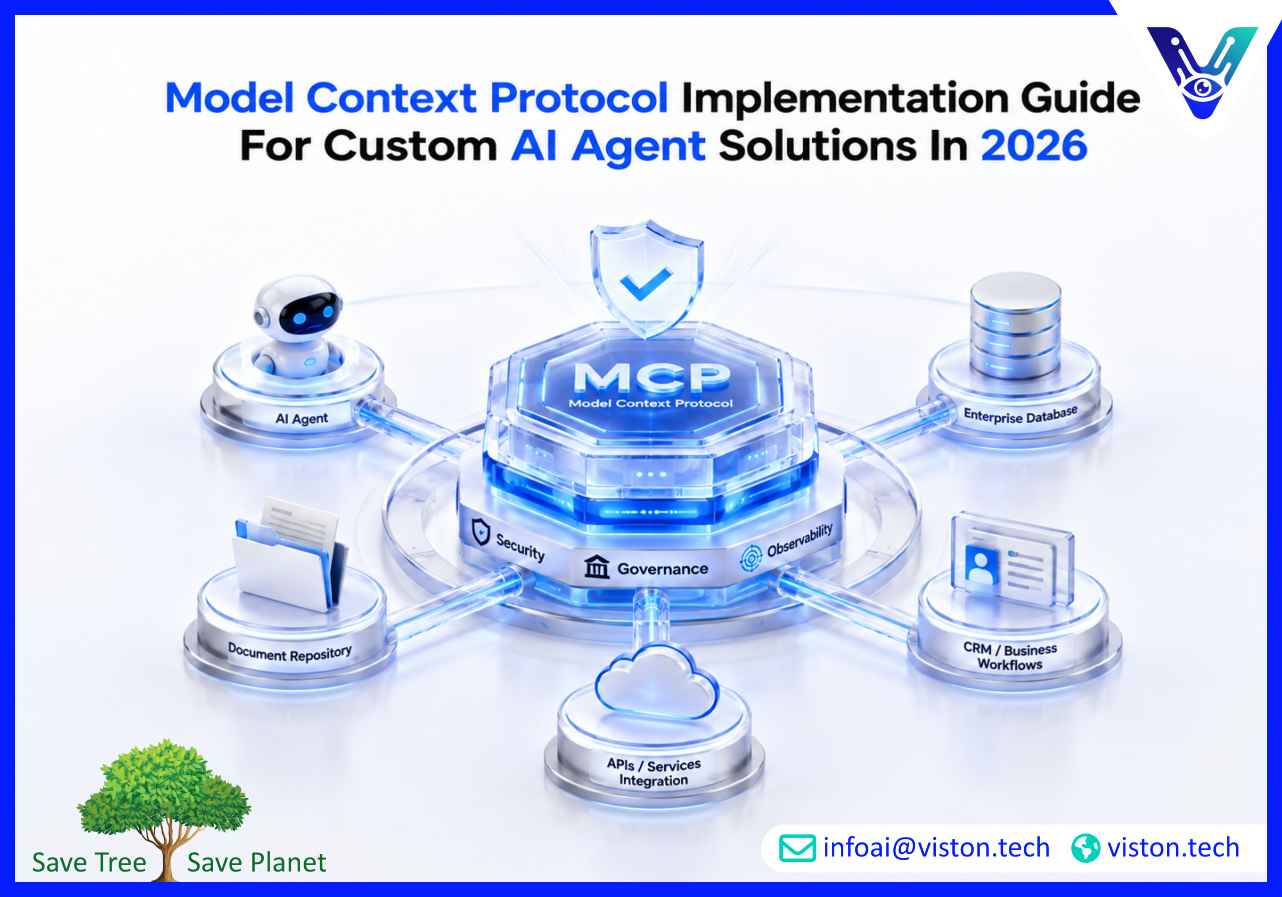
The Model Context Protocol, commonly called MCP, is an open standard that helps AI applications connect with external systems in a structured way. Instead of building separate custom integrations for every database, software tool, API, file system, or internal workflow, MCP creates a shared method for agents to discover and interact with approved resources.
For business leaders, the value is simple: MCP helps AI agents become more useful without making integrations chaotic.
A custom AI agent may need to read customer records, check inventory, query a knowledge base, summarize documents, update a CRM, raise a support ticket, or trigger an approval workflow. Without a standardized connection layer, each function often requires separate engineering work, security review, and maintenance. MCP reduces that fragmentation by giving developers a more consistent integration pattern.
This matters because AI agent adoption is no longer limited to experiments. Businesses now expect agents to support sales operations, customer service, logistics, finance, HR, software engineering, procurement, and internal knowledge work. MCP gives those agents a cleaner way to access context and take action within defined boundaries.
Why MCP Implementation Matters in 2026
In 2026, businesses are under pressure to make AI investments practical, measurable, and secure. Many early AI projects failed because they were disconnected from real business systems. They could answer questions, but they could not reliably complete work.
MCP helps close that gap.
A well-implemented MCP architecture allows AI agents to connect with enterprise systems while maintaining control over permissions, tool access, data exposure, and auditability. This is especially important for organizations using multiple AI models, multiple agent frameworks, or hybrid environments across cloud platforms and internal systems.
The business case is not just technical convenience. MCP can improve:
- Agent reliability
- Integration scalability
- Workflow automation
- Data access control
- Developer productivity
- Reuse of tools across agents
- Governance and observability
- Long-term flexibility
For companies building custom AI agent solutions, MCP can become the integration backbone that prevents agent projects from becoming difficult to scale.
How MCP Works in Custom AI Agent Solutions
MCP typically involves three main components: MCP hosts, MCP clients, and MCP servers.
The host is the AI application or agent environment. The client manages communication between the agent and external resources. The server exposes specific tools, data, or workflows that the agent is allowed to use.
For example, a business may create MCP servers for:
- CRM data
- ERP workflows
- Document repositories
- Internal databases
- Customer support platforms
- Analytics dashboards
- Search systems
- Project management tools
- Financial reporting systems
- Custom business APIs
The AI agent does not need unlimited access to every system. Instead, it interacts through approved MCP servers that expose specific capabilities. This makes the implementation more manageable and safer than giving an agent broad, uncontrolled access.
Step-by-Step Model Context Protocol Implementation Guide
1. Define the Business Use Case First
MCP implementation should start with a clear business use case, not with the protocol itself.
Before designing servers or agent workflows, identify what the agent must achieve. For example:
- Automating customer support triage
- Helping sales teams retrieve account intelligence
- Supporting procurement document review
- Coordinating logistics updates
- Generating operational reports
- Assisting developers with internal documentation
- Managing repetitive back-office workflows
A focused use case helps determine what context the agent needs, which systems it should access, and what actions it may perform.
2. Map Required Data, Tools, and Workflows
Once the use case is clear, map the systems involved. This includes structured data, unstructured documents, APIs, business applications, and human approval steps.
A strong MCP implementation plan should answer:
- What data does the agent need?
- Where does that data live?
- Which tools should the agent call?
- Which actions require human approval?
- What systems should remain read-only?
- What permissions are required?
- What logs must be retained?
- What compliance risks exist?
This step prevents overexposure of sensitive systems and ensures the agent receives only the context needed to complete the task.
3. Design MCP Servers Around Business Capabilities
MCP servers should be designed around specific business capabilities rather than broad system access.
For example, instead of exposing an entire CRM, a company may create MCP tools such as:
- Get customer profile
- Retrieve recent support tickets
- Check contract status
- Create follow-up task
- Summarize account history
This makes agent behavior easier to govern and test. Each tool has a defined purpose, input format, output format, and permission model.
4. Build Strong Authentication and Authorization
Security is one of the most important parts of MCP implementation. AI agents should not be treated as trusted users with unlimited access.
Effective implementation requires:
- Role-based access control
- User-level permission checks
- Secure token handling
- Least-privilege access
- Environment separation
- Encrypted communication
- Secret management
- Approval gates for sensitive actions
For enterprise use, agents should inherit or respect existing access policies wherever possible. If an employee cannot access a document or system manually, the agent should not be able to access it on their behalf.
5. Add Guardrails for Tool Use
MCP gives agents the ability to use tools, but tool use must be controlled. Poorly designed agents may call the wrong tool, misinterpret outputs, or take actions without enough context.
Guardrails may include:
- Tool allowlists
- Input validation
- Output filtering
- Confirmation steps
- Rate limits
- Action thresholds
- Human-in-the-loop approvals
- Restricted write access
- Prompt injection defenses
For business-critical workflows, agents should not be allowed to make irreversible changes without review.
6. Test the Agent in Realistic Scenarios
Testing must go beyond simple technical checks. A custom AI agent should be tested against real business scenarios, edge cases, incomplete data, conflicting information, and permission restrictions.
Useful testing areas include:
- Accuracy of retrieved context
- Correct tool selection
- Handling of missing data
- Response consistency
- Failure recovery
- Security boundary enforcement
- Workflow completion rates
- Human escalation behavior
- Performance under load
Testing should involve business users, not only developers. The goal is to confirm that the agent works in real operational conditions.
7. Monitor, Measure, and Improve
MCP-based agents need ongoing monitoring. Businesses should track how agents use tools, where they fail, which workflows save time, and whether users trust the outputs.
Important metrics include:
- Task completion rate
- Tool call success rate
- Escalation frequency
- Average handling time
- User satisfaction
- Error patterns
- Cost per workflow
- Security events
- Integration uptime
This data helps teams refine prompts, improve tools, update permissions, and expand agent capabilities safely.
Common MCP Implementation Challenges
Over-Connecting Systems Too Early
One common mistake is connecting too many systems before the agent use case is mature. This increases security risk and makes debugging harder. Start with a narrow workflow, validate value, then expand.
Poor Tool Design
If tools are too broad, vague, or poorly documented, agents may use them incorrectly. Good MCP tools should be specific, predictable, and easy for the model to understand.
Weak Governance
Without clear governance, MCP can create hidden risk. Businesses need ownership for tool approval, access control, monitoring, incident response, and change management.
Ignoring Prompt Injection Risk
Agents connected to external systems may encounter malicious or misleading content. MCP implementation should include defenses against prompt injection, unsafe instructions, and unauthorized tool use.
Lack of Business Alignment
MCP is not valuable by itself. Its value comes from enabling agents to complete meaningful business tasks. Every implementation decision should connect back to measurable operational outcomes.
Where MCP Adds the Most Value
MCP is especially useful when a business needs AI agents to work across multiple systems.
High-value use cases include:
- Customer service agents that access tickets, knowledge bases, and customer history
- Sales agents that summarize accounts, opportunities, and follow-up actions
- Operations agents that monitor workflows and identify exceptions
- Finance agents that retrieve reports and assist with reconciliation
- HR agents that answer policy questions and guide internal processes
- IT agents that check documentation, logs, and service requests
- Data agents that query approved datasets and generate summaries
In each case, MCP helps the agent access the right context without requiring a separate custom integration for every function.
How Custom AI Agent Solutions Benefit from MCP
Custom AI agent solutions are designed around specific business needs. Unlike generic AI tools, custom agents can be tailored to company workflows, data structures, approval processes, and operational goals.
MCP strengthens these solutions by making integrations more modular and scalable. A business can build reusable MCP servers for important systems and allow multiple agents to use them under controlled permissions.
This supports a more mature agent strategy. Instead of building one isolated automation, companies can develop an agent ecosystem where different agents share approved tools, follow consistent security rules, and support different departments.
For growing businesses, this is important. It allows AI adoption to expand without creating disconnected projects that are difficult to maintain.
Viston AI’s Role in MCP-Ready Custom AI Agent Solutions
Viston AI is relevant to model context protocol implementation because its Custom AI Agent Solutions focus on building, deploying, and scaling task-focused autonomous agents for business workflows. Its service positioning includes end-to-end AI agent development using frameworks and platforms such as AutoGen Studio, CrewAI, and Vertex AI Agent Builder, which are commonly associated with multi-agent workflows, orchestration, enterprise automation, and scalable AI deployment.
For organizations exploring MCP, this type of capability matters because implementation is not only about connecting a protocol. Businesses need agents that understand workflow logic, use tools safely, retrieve the right context, and operate within practical business constraints. Viston AI’s custom agent approach can support use cases where companies need AI agents to automate complex tasks, improve workforce productivity, and connect intelligent systems with operational processes.
This is especially useful for companies that do not want a generic chatbot, but need a tailored agent architecture aligned with their internal systems, data flows, and automation goals. By combining custom AI agent development with structured integration planning, Viston AI can help businesses move from experimentation to more reliable, scalable, and business-focused agent implementation.
Best Practices for MCP Implementation
Start Small and Prove Value
Choose one high-impact workflow with clear success criteria. Avoid trying to transform every department at once.
Use Least-Privilege Access
Give each agent and tool only the access required for its task. This reduces security exposure and supports better compliance.
Keep Humans in Control
For sensitive workflows, include review and approval steps. Human oversight remains essential for financial, legal, operational, and customer-impacting decisions.
Document Every Tool
Each MCP tool should have clear documentation, expected inputs, expected outputs, access rules, and failure handling.
Build for Observability
Logs, traces, and monitoring should be part of the architecture from the beginning. Businesses need visibility into what agents are doing and why.
Plan for Maintenance
Systems change, APIs evolve, business rules shift, and agent behavior must be reviewed. MCP implementation should include ongoing support and optimization.
FAQs
What is the purpose of Model Context Protocol?
Model Context Protocol helps AI agents connect with external tools, data sources, and workflows through a standardized structure. It allows agents to access business context and perform approved actions more reliably.
Is MCP only for developers?
No. Developers implement MCP, but the business value affects operations, customer service, sales, finance, IT, and leadership teams. It helps AI agents become useful in real workflows.
Why is MCP important for custom AI agent solutions?
Custom AI agents need secure access to company-specific systems. MCP provides a cleaner way to connect agents with approved tools and data without building every integration from scratch.
What are the main risks of MCP implementation?
Key risks include excessive system access, weak authentication, unsafe tool use, prompt injection, poor monitoring, and unclear governance. These risks can be reduced with careful architecture and testing.
Can Viston AI help with MCP-related AI agent implementation?
Viston AI’s Custom AI Agent Solutions are aligned with MCP-related needs because they focus on building and scaling task-focused autonomous agents for business workflows, automation, and enterprise AI adoption.
How should a company start with MCP?
Start with one defined business workflow, identify the systems and tools the agent needs, design secure MCP servers, test with real users, and expand only after proving value.
Conclusion
Model context protocol implementation is becoming a practical foundation for businesses building custom AI agent solutions in 2026. It helps agents connect with real systems, retrieve useful context, and perform approved tasks with stronger structure and control. The most successful implementations start with clear business workflows, secure access design, careful tool governance, and ongoing monitoring. For companies planning scalable AI automation, MCP should be treated as part of a broader agent strategy, not just a technical integration. Viston AI’s custom AI agent development capabilities make it a relevant partner for organizations looking to turn agent concepts into reliable business solutions.
