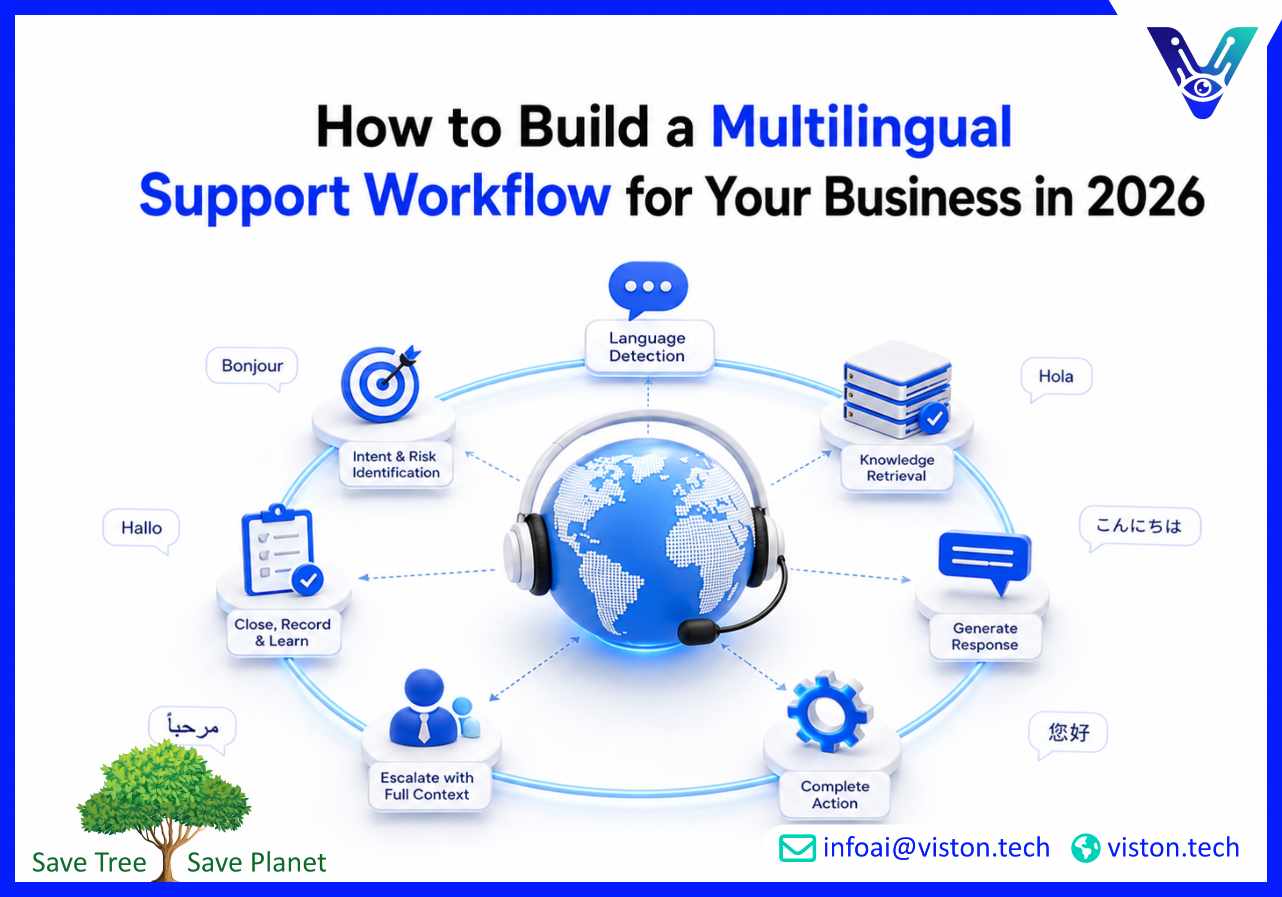
How to Build a Multilingual Support Workflow for Your Business in 2026
Building a multilingual support workflow helps a business serve international customers without creating inconsistent answers, slow handovers, or an unmanageable staffing burden. The strongest model combines language detection, approved knowledge, AI-assisted automation, human escalation, system integration, and language-level reporting in one controlled operating process.
What a Multilingual Support Workflow Should Achieve
A multilingual support workflow is the structured path a customer enquiry follows from the moment it arrives until it is resolved, escalated, or closed. It defines how the business identifies the customer’s language, understands the request, retrieves the correct information, delivers a response, records the interaction, and transfers the case when human judgment is required.The workflow should do more than translate messages. Support also depends on intent, customer context, policy accuracy, urgency, permissions, and operational follow-through. A fluent answer still fails if it applies the wrong policy or sends a complaint to the wrong team.For most businesses, a reliable multilingual support workflow should achieve five outcomes:
Give customers clear and consistent answers in supported languages.
Resolve repetitive, low-risk enquiries without unnecessary agent effort.
Escalate sensitive, complex, or high-value cases at the right time.
Connect conversations with CRM, helpdesk, ecommerce, booking, or account systems.
Measure service quality separately for each language and channel.
The operating model must define its boundaries. Select priority languages according to customer demand, revenue opportunity, service volume, and operational readiness. A focused workflow for three well-supported languages is more valuable than broad but unreliable coverage.
Start with real customer demand
Review support tickets, chat transcripts, customer locations, sales enquiries, refunds, abandoned conversations, and expansion plans. Create a language priority list and an intent list covering needs such as order tracking, account access, billing, booking changes, onboarding, troubleshooting, returns, or lead qualification.
How to Build a Multilingual Support Workflow Step by Step
The best multilingual support workflows are designed around the customer journey rather than the translation tool. Each stage should have a clear purpose, owner, data source, automation rule, and fallback path.
1. Capture the enquiry and detect the language
The workflow begins when a customer contacts the business through website chat, WhatsApp, email, social messaging, a mobile app, or a helpdesk form. The system should detect the language automatically while allowing the customer to change it when detection is uncertain.Profile data, previous conversations, browser settings, and account preferences can improve routing. However, the workflow should not assume that a customer always wants service in the language associated with their location.
2. Identify intent, urgency, and risk
After detecting the language, the system should determine what the customer is trying to achieve. Common intents may include checking an order, requesting a refund, updating an account, booking an appointment, reporting a technical problem, or asking for product guidance.The workflow should also classify urgency and risk. Routine enquiries can move into automation, while complaints, payment disputes, legal requests, security concerns, and unusual technical problems should follow stricter escalation rules.
3. Retrieve information from approved sources
Every automated answer should be grounded in trusted business content. This may include localized help articles, policy documents, product information, CRM records, order data, booking systems, knowledge bases, or internal standard operating procedures.Create a clear source hierarchy. Public policy pages may govern standard returns, while the CRM governs customer-specific contracts. When sources conflict or information is missing, the system should avoid guessing and route the case for review.
4. Generate or select the response
For repetitive enquiries, the system can use approved response templates or AI-generated answers grounded in verified content. The response should preserve product names, technical terms, policy meaning, and required next steps.Localization must account for dates, currencies, measurements, formality, and terminology. Maintain a multilingual glossary for brand terms, product features, legal wording, service levels, and phrases that must remain untranslated.
5. Complete the required action
A useful support workflow should not stop at answering a question when the customer needs an action. It may need to check order status, create a ticket, schedule a meeting, update a CRM record, send a password-reset link, collect lead information, or trigger a return process.The assistant should pass structured data into business systems accurately and record the result. Translation without operational follow-through forces customers and agents to repeat work.
6. Escalate with full context
When the enquiry requires a person, the handover should include the original message, translated summary, detected intent, customer details, account or order information, sentiment, actions already attempted, and the reason for escalation.Routing rules can assign cases to a fluent agent, specialist team, or employee using translated assistance. The customer should not restart the conversation, and the workflow should set a clear response expectation.
7. Close, record, and learn
After resolution, record the outcome, language, intent, escalation reason, and customer feedback. These records reveal missing knowledge, weak translations, failed integrations, and new needs.
How to Maintain Quality, Security, and Human Oversight
Multilingual support can scale quickly, but quality problems also scale quickly. Governance is therefore part of the workflow, not a separate administrative exercise.
Create approved multilingual knowledge
Start with accurate source content in the business’s primary language. Remove duplicates, outdated policies, conflicting instructions, and unclear ownership. Then localize priority content using a combination of translation technology and human review appropriate to the risk of the material.High-risk content such as contracts, regulated information, privacy notices, safety instructions, and dispute handling requires stronger human review.
Define confidence and escalation thresholds
The system needs rules for when it can answer, when it should ask a clarifying question, and when it must transfer the conversation. These thresholds may vary by intent. A store-hours question can tolerate more automation than an account-security complaint.Repeated misunderstandings, negative sentiment, missing data, failed actions, and low-confidence retrieval should trigger escalation.
Protect customer and business data
Multilingual workflows often connect several systems and may process personal, payment, employee, contractual, or account information. Apply role-based access, data minimization, encryption, retention controls, audit logs, and clear permissions for each channel and user type.Knowledge access should reflect whether the user is a prospect, customer, employee, partner, or administrator.
Test with native and real-world language
Do not test only with polished translated sentences. Customers use abbreviations, spelling mistakes, mixed-language messages, regional expressions, informal wording, and product-specific terminology. Test the workflow with realistic examples from actual conversations and review results with fluent speakers where possible.Test incomplete information, unsupported languages, integration failure, escalation, and recovery so the team understands how the workflow behaves under imperfect conditions.
How to Launch and Measure the Workflow
A phased launch is usually safer than activating every language, channel, and use case at once. Begin with high-volume, low-risk enquiries in the most commercially important languages. Validate the workflow, correct weaknesses, and expand only when performance is stable.
Choose a practical first phase
A useful first phase may include two or three languages, one or two channels, and defined intents. An ecommerce company might begin with product information, order tracking, delivery questions, and standard returns.Assign ownership for knowledge, language quality, automation rules, integrations, analytics, security, and escalation. Without clear ownership, outdated answers and unresolved failures accumulate.
Track performance by language and intent
Overall averages can hide poor performance in a specific language. Build reporting that shows results by language, channel, intent, customer type, and resolution path.Useful multilingual support metrics include:
First-response time and average resolution time
Self-service resolution rate
Fallback and misunderstanding rate
Human escalation rate and handover quality
Customer satisfaction by language
Repeat-contact rate
Workflow completion and integration success rate
Translation correction frequency
Review failed conversations regularly. A high fallback rate may indicate missing knowledge, weak intent coverage, detection problems, or unfamiliar phrasing. Escalation trends can also reveal where automation is too limited.
Improve the workflow continuously
Use conversation reviews, agent feedback, ratings, and logs to update knowledge, add intents, improve routing, and remove unnecessary steps. Review frequently after launch, then move to monthly optimization and periodic audits.Expand only when demand, revenue potential, support readiness, reliable data, and safe escalation justify it.
How Viston AI Can Support a Multilingual Support Workflow
Viston AI provides Multilingual AI Chatbot Support for businesses that need to manage customer conversations across languages, channels, and operational systems. Its relevant capabilities include language-aware intent recognition, real-time translation and localization, omnichannel deployment, intelligent routing, performance analytics, and integration with CRM platforms, knowledge bases, transaction systems, and other business applications.These capabilities support the full workflow rather than translation alone. A business can use multilingual automation to identify customer intent, retrieve approved information, complete routine actions, and transfer complex enquiries with conversation context preserved. This is useful for ecommerce, SaaS, marketplaces, hospitality, professional services, and other organizations serving customers across regions.Viston AI’s delivery approach can support discovery, data preparation, workflow design, system integration, testing, deployment, monitoring, and continuous optimization. That structure matters because multilingual support quality depends on how knowledge, automation, escalation, and reporting work together.For a growing business, the practical value is controlled scalability. The workflow can begin with selected languages and high-demand use cases, then expand as customer demand and operational confidence increase. This allows the organization to improve response consistency, reduce repetitive manual work, and maintain clearer oversight of service quality across languages.
Frequently Asked Questions
What is the first step in building a multilingual support workflow?
Start by analysing customer demand. Identify the languages, channels, and enquiry types that generate the most support volume or commercial value. This prevents the business from investing in broad language coverage before it has a clear operating need.
Should every multilingual enquiry be automated?
No. Routine, well-documented, low-risk enquiries are suitable for automation. Complaints, disputes, legal issues, sensitive account matters, complex technical problems, and high-value cases should have clear human escalation paths.
How many languages should a business support initially?
Begin with the two or three languages showing the strongest demand, revenue opportunity, and operational readiness. Quality matters more than the total offered.
What systems should connect to a multilingual support workflow?
Common integrations include CRM, helpdesk, ecommerce, order management, booking, account, knowledge base, marketing automation, and analytics platforms. The right systems depend on the actions customers need the support workflow to complete.
How can multilingual support quality be measured?
Measure first-response time, resolution rate, fallback rate, escalation rate, repeat contact, customer satisfaction, translation corrections, and workflow success separately for each language, channel, and intent.
Can Viston AI help build the workflow in phases?
Viston AI’s multilingual chatbot, integration, routing, analytics, and optimization capabilities are suitable for phased implementation. A business can begin with selected languages and use cases, validate performance, and expand coverage based on measurable demand.
Conclusion
A successful multilingual support workflow combines language technology with approved knowledge, business-system integration, clear escalation, human oversight, and continuous measurement. Businesses should begin with the languages and enquiries that matter most, automate only where rules and data are reliable, and review performance separately for every supported language. Multilingual Support is most effective when it resolves real customer needs rather than simply translating messages. Viston AI offers relevant multilingual chatbot, routing, integration, and analytics capabilities for organizations seeking a scalable and operationally controlled approach.