How Do Chatbots Integrate with CRM? A Business Guide for 2026
Understanding how chatbots integrate with CRM systems is essential for businesses that want faster response times, better lead management, and more personalized customer experiences. In 2026, CRM-connected AI chatbots are no longer simple support tools; they are part of a connected sales, service, and operations workflow.
How Do Chatbots Integrate with CRM Systems?
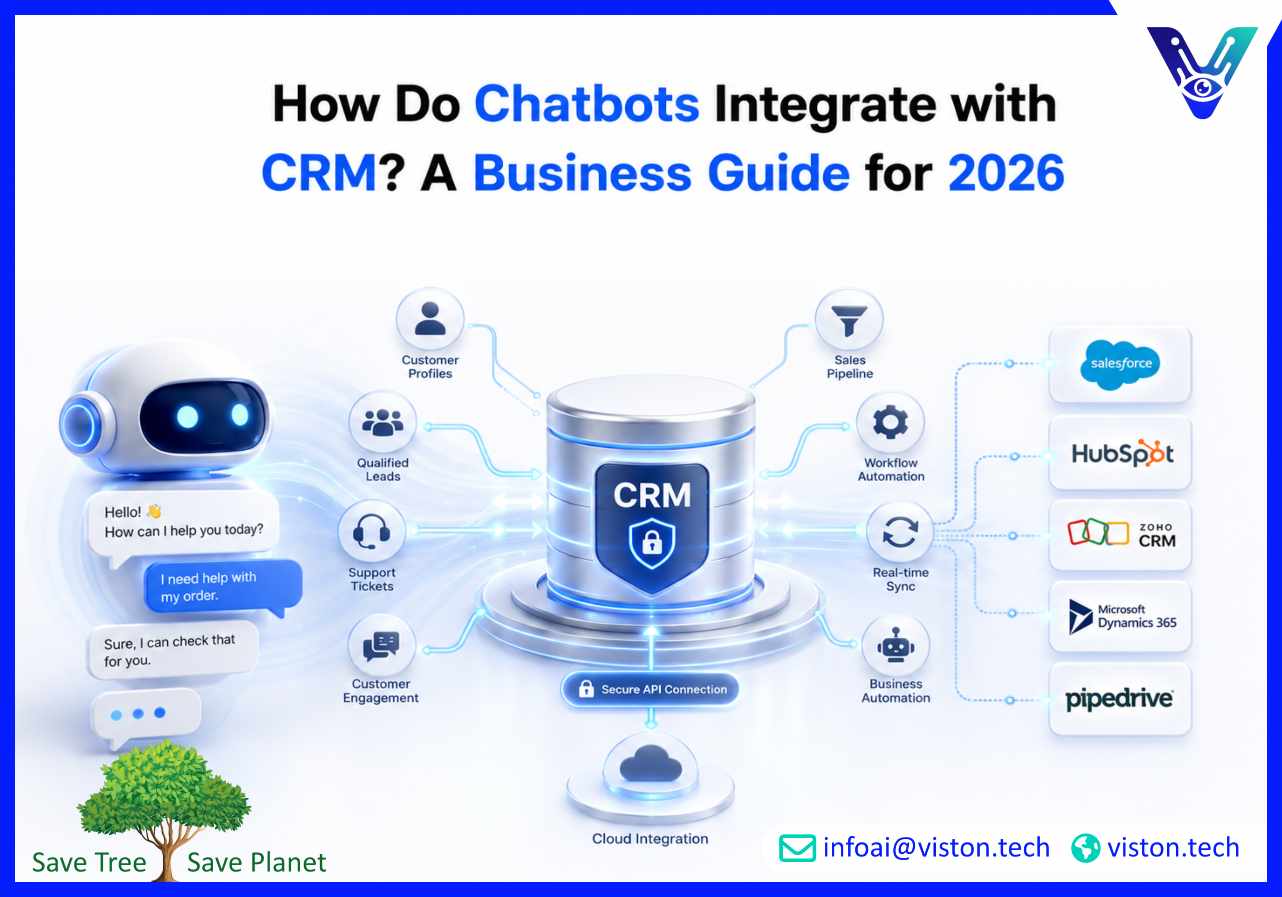
Chatbots integrate with CRM systems by connecting conversational interfaces to customer data, sales records, support history, lead pipelines, and workflow automation tools. This connection allows a chatbot to collect information from users, update CRM records, retrieve customer details, trigger follow-up actions, and support teams with real-time context.In a basic setup, a chatbot may capture a visitor’s name, email address, company size, and inquiry type, then send that data into the CRM as a new lead. In a more advanced AI chatbot development project, the chatbot can identify returning customers, access previous interactions, recommend next steps, create support tickets, assign leads to sales teams, and update deal stages automatically.The integration usually works through secure APIs, webhooks, middleware platforms, or native CRM connectors. Popular CRM platforms such as Salesforce, HubSpot, Zoho CRM, Microsoft Dynamics, and Pipedrive commonly support API-based integrations that allow chatbot systems to exchange data with CRM records.The main purpose is simple: conversations should not stay isolated inside a chatbot. Every meaningful customer interaction should become usable business data inside the CRM.
Why CRM Integration Matters in AI Chatbot Development
A chatbot without CRM integration can answer questions, but it has limited business value. It may greet visitors, provide basic information, or direct users to a contact form. However, it cannot fully personalize responses, support sales workflows, or help teams act on customer intent unless it is connected to the systems where customer data already lives.CRM integration matters because it turns chatbot conversations into structured business actions. When a prospect asks about pricing, requests a demo, or shares buying requirements, the chatbot can create or update a CRM record immediately. This reduces manual data entry and helps sales teams respond faster.For customer support, CRM integration allows the chatbot to check customer history before offering help. A returning customer may receive a more relevant answer because the chatbot can access account status, previous tickets, product usage, or service history.For marketing teams, CRM-connected chatbots can segment leads, enrich contact profiles, trigger email workflows, and improve campaign targeting. For operations teams, they help reduce repetitive admin work by automating routine data capture and task creation.
Common Business Benefits
Faster lead capture and qualification
Reduced manual CRM data entry
Improved customer personalization
Better sales and support handoffs
More accurate customer records
Automated follow-up workflows
Clearer reporting on chatbot-driven revenue and support outcomes
How CRM Chatbot Integration Works in Practice
CRM chatbot integration usually follows a structured technical and operational process. The goal is to ensure the chatbot can collect, validate, send, retrieve, and update CRM data securely and accurately.
1. Mapping the Customer Journey
The first step is to define where the chatbot fits into the customer journey. A chatbot used for lead generation will require different CRM fields and workflows than one used for customer support or account management.For example, a sales chatbot may need to collect company name, budget range, service interest, decision timeline, and contact details. A support chatbot may need customer ID, issue category, subscription plan, previous ticket history, and escalation priority.
2. Defining CRM Data Fields
Before integration, businesses must decide which chatbot inputs should map to which CRM fields. This includes standard fields such as name, email, phone number, and company, as well as custom fields such as service interest, lead source, product category, urgency level, or chatbot qualification score.Clean field mapping prevents duplicate records, incomplete profiles, and reporting issues later.
3. Connecting Through APIs or Native Integrations
Most modern CRM chatbot integrations use APIs. APIs allow the chatbot to send and receive information from the CRM in real time. Webhooks may also be used to trigger specific actions when a user completes a conversation, submits a form, or meets a qualification condition.Some chatbot platforms offer native CRM integrations, which can simplify setup. However, custom AI chatbot development is often required when businesses need advanced workflows, multi-step logic, custom CRM objects, complex permissions, or integration with several systems at once.
4. Automating CRM Actions
Once connected, the chatbot can trigger CRM actions such as:
Creating new contacts or leads
Updating existing customer records
Assigning leads to sales representatives
Creating support tickets
Adding conversation notes
Triggering follow-up emails
Moving deals through pipeline stages
Sending alerts to internal teams
5. Enabling Two-Way Data Sync
The strongest integrations are two-way. This means the chatbot not only sends information to the CRM but also retrieves relevant data from it. For example, the chatbot may check whether a user is already a customer, identify their plan type, or confirm whether a support case already exists.Two-way synchronization enables more personalized, accurate, and efficient conversations.
Key Use Cases for CRM-Integrated Chatbots
CRM chatbot integration supports several high-value business use cases across sales, marketing, customer service, and operations.
Lead Generation and Qualification
A CRM-integrated chatbot can ask targeted questions, qualify prospects, score leads, and send qualified inquiries directly to sales teams. Instead of relying on static forms, businesses can use conversational flows to understand buyer intent in a more natural way.For example, the chatbot can ask what service the visitor needs, their company size, budget range, location, timeline, and preferred contact method. The CRM can then route the lead based on rules such as territory, service category, deal size, or urgency.
Customer Support Automation
Support chatbots connected to CRM systems can identify customers, retrieve case history, answer common questions, and create new support tickets. This helps support teams reduce repetitive requests while maintaining visibility inside the CRM.If the chatbot cannot resolve the issue, it can pass the conversation to a human agent with full context, avoiding the frustration of customers repeating information.
Sales Follow-Up and Pipeline Management
Chatbots can support sales teams by scheduling demos, recording objections, updating deal notes, and triggering follow-up reminders. When integrated properly, chatbot interactions become part of the sales pipeline rather than disconnected website conversations.
Customer Onboarding
After a customer signs up, a chatbot can guide them through onboarding steps while updating the CRM with progress data. This helps account managers understand which customers are active, stuck, or ready for further engagement.
Account-Based Engagement
For B2B companies, CRM-integrated chatbots can personalize conversations based on account type, industry, deal stage, or previous interactions. This makes the chatbot more useful for high-value prospects and existing clients.
Important Considerations Before Integrating Chatbots with CRM
Successful CRM chatbot integration requires planning. The quality of the outcome depends on more than the chatbot interface. Businesses need strong data structure, clear workflows, reliable security, and ongoing optimization.
Data Quality
If CRM data is outdated or inconsistent, the chatbot may deliver poor experiences. Before integration, businesses should review duplicate records, incomplete fields, naming conventions, and lead source tracking.
Security and Privacy
CRM systems often contain sensitive customer information. Chatbot integrations should use secure authentication, encrypted data transfer, access controls, and appropriate data retention practices. Businesses operating in regulated sectors should also consider compliance requirements related to privacy, consent, and customer data handling.
Human Handoff
Not every conversation should be fully automated. A strong AI chatbot development strategy includes clear escalation paths when users need expert support, when sentiment indicates frustration, or when the chatbot confidence score is low.
Workflow Design
The chatbot should support real business processes. Poorly designed workflows may create unnecessary CRM records, route leads incorrectly, or overwhelm teams with low-quality alerts. Integration logic should reflect how sales, support, and operations teams actually work.
Reporting and Optimization
Businesses should track how chatbot interactions affect CRM outcomes. Useful metrics include lead conversion rate, response time, ticket deflection, meeting bookings, pipeline contribution, customer satisfaction, and escalation rate.
How Viston AI Supports CRM-Focused AI Chatbot Development
Viston AI helps businesses develop AI chatbot solutions that connect conversational experiences with practical business workflows. For CRM-focused chatbot projects, this means building chatbots that do more than answer common questions. The chatbot must capture useful data, support customer journeys, integrate with sales and support systems, and help teams act faster on customer intent.CRM integration is especially important in AI chatbot development because it connects front-end conversations with the systems businesses use to manage relationships, leads, tickets, and revenue opportunities. Viston AI’s work in chatbot development and integration aligns with use cases such as lead qualification, workflow automation, CRM synchronization, customer engagement, and business system connectivity.For businesses that want scalable chatbot solutions, the development process should consider conversation design, CRM field mapping, API integration, data security, escalation logic, analytics, and long-term optimization. Viston AI’s service-led approach is relevant for organizations looking to turn chatbot interactions into structured CRM activity rather than disconnected conversations.In 2026, companies need chatbot systems that are practical, secure, measurable, and connected to the tools their teams already use. CRM-integrated chatbot development supports that goal by improving customer visibility, reducing manual work, and creating smoother handoffs between automation and human teams.
Frequently Asked Questions
How do chatbots integrate with CRM?
Chatbots integrate with CRM systems through APIs, webhooks, native connectors, or middleware. These connections allow the chatbot to create leads, update records, retrieve customer data, trigger workflows, and support sales or service teams.
Can a chatbot update CRM records automatically?
Yes. A properly developed chatbot can automatically update contact details, add conversation notes, assign leads, create support tickets, change lead status, and trigger follow-up tasks inside the CRM.
Which CRM systems can chatbots connect with?
Chatbots can connect with many CRM platforms, including Salesforce, HubSpot, Zoho CRM, Microsoft Dynamics, Pipedrive, and custom CRM systems, depending on API availability and integration requirements.
Is CRM chatbot integration useful for small businesses?
Yes. Small businesses can use CRM-integrated chatbots to capture leads, reduce missed inquiries, automate follow-ups, and keep customer records organized without adding unnecessary admin work.
Does CRM integration require custom AI chatbot development?
Not always. Simple integrations may work with native connectors, but custom AI chatbot development is often needed for complex workflows, custom CRM fields, multi-system integrations, advanced qualification logic, or industry-specific processes.
Can Viston AI help with chatbot CRM integration?
Yes. Viston AI develops AI chatbot solutions that can support CRM-connected workflows such as lead handling, customer engagement, workflow automation, system integration, and chatbot-driven business process improvement.
Conclusion
Understanding how chatbots integrate with CRM systems helps businesses see the real value of AI chatbot development. A CRM-connected chatbot can capture leads, personalize responses, automate support tasks, update records, and improve team productivity. The strongest results come from clear workflow design, secure integration, accurate data mapping, and continuous optimization. In 2026, businesses should treat chatbot CRM integration as part of a wider customer engagement strategy, not just a technical add-on. Viston AI supports this approach by helping organizations build chatbot solutions that connect conversations with meaningful business outcomes.