How to Integrate a Voice Assistant with CRM in 2026
Learning how to integrate a voice assistant with CRM is essential for businesses that want spoken customer interactions to create accurate records, trigger workflows, and support timely follow-up. A successful integration connects conversation intelligence with sales, service, and operations processes without compromising data quality, security, or the customer experience.
How Voice Assistant CRM Integration Works
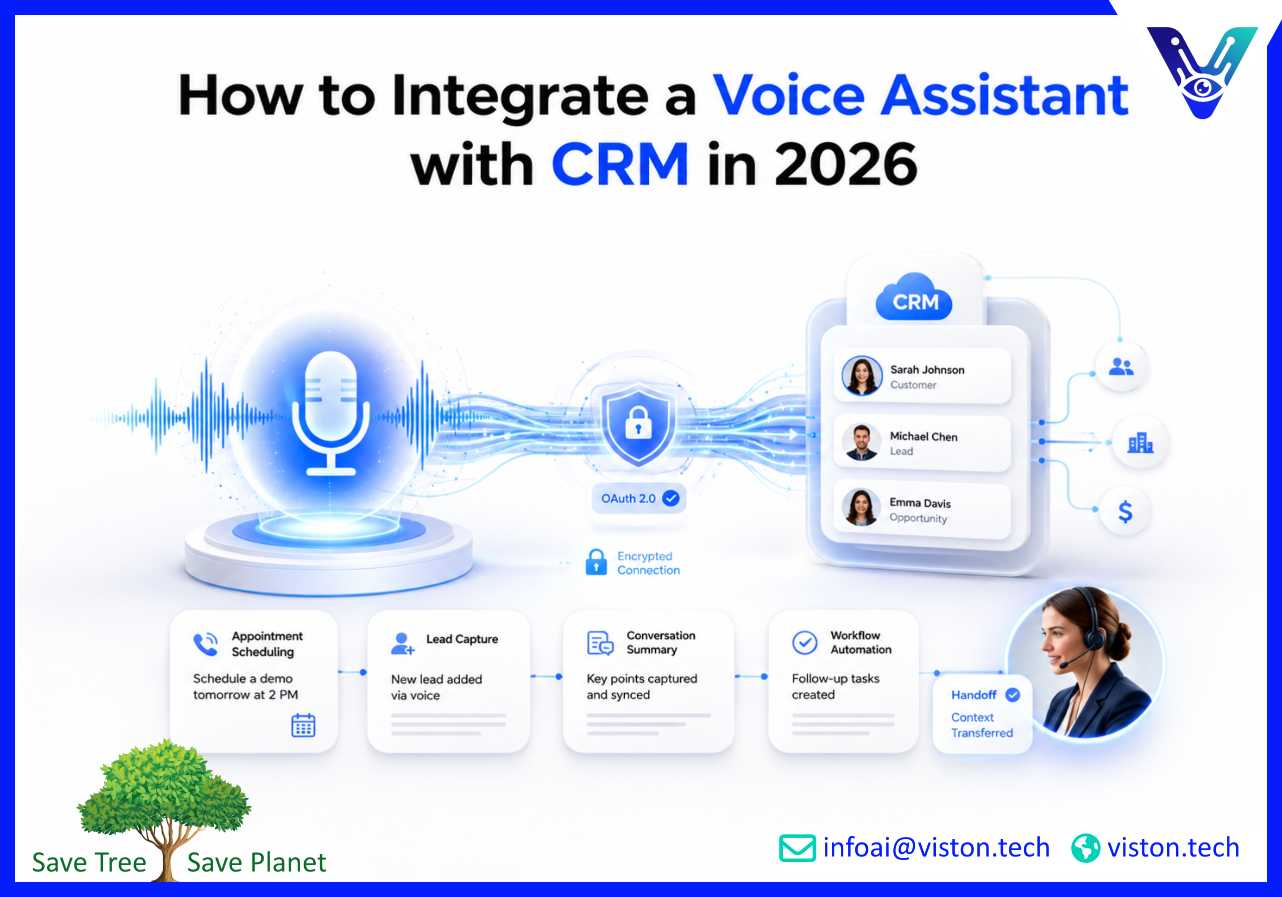
Voice assistant CRM integration connects a conversational voice system to the customer relationship management platform used by sales, service, marketing, or account teams. Instead of operating as a separate call-handling tool, the assistant can identify a customer, retrieve permitted information, complete an approved action, and write the interaction outcome back to the correct CRM record.The architecture normally has four layers. The voice layer handles telephony, speech-to-text, and text-to-speech. The conversational layer identifies intent, manages dialogue, and extracts details such as names or account numbers. An integration layer authenticates requests, applies business rules, and communicates with the CRM, which remains the system of record.
Define what the assistant can read and write
Start with a controlled list of CRM permissions. A sales assistant may create a lead, check for an existing contact, capture qualification details, book a meeting, and assign a follow-up task. A service assistant may verify a caller, retrieve case status, add a conversation summary, create a support ticket, or transfer the caller to an agent with context.Do not give the assistant unrestricted access. Each action needs a defined purpose, required fields, authorization rule, validation step, and failure path. High-impact actions such as refunds, ownership changes, or contractual updates should require stronger verification or human approval.
Choose the right integration pattern
Businesses usually connect voice assistants through direct APIs, middleware, integration platforms, or a combination of these methods. Direct APIs offer control and low latency. Middleware helps transform, queue, or distribute data. Low-code connectors can accelerate standard actions but still require sound mapping, authentication, monitoring, and exception handling.Modern CRM platforms commonly expose REST or web APIs and use OAuth-based authorization for external applications. Salesforce documents OAuth 2.0 for connected applications, while Microsoft Dataverse supports OAuth authentication for Web API access. The correct setup should use scoped permissions, managed credentials, and separate development, testing, and production environments.
Step-by-Step Process to Integrate a Voice Assistant with CRM
1. Select a narrow, valuable use case
Begin with one or two workflows where voice creates clear value, such as lead qualification, appointment booking, order-status enquiries, ticket creation, or post-call CRM updates. A focused scope reduces integration risk and gives teams a reliable way to measure results.Map the conversation from opening prompt to completion or handover. Specify what information is needed, what may be retrieved, which CRM object is updated, and what confirmation the user receives. This becomes the shared blueprint for technical and business teams.
2. Audit CRM data and processes
A voice assistant cannot compensate for weak CRM governance. Review mandatory fields, duplicate rules, sales stages, case categories, ownership, consent, and retention requirements. Identify the authoritative source for identity, account status, pricing, availability, and service history.Clean data is particularly important because spoken input can contain variations, accents, background noise, abbreviations, or similar-sounding values. The assistant should confirm critical details before writing them. For example, it can repeat an email address, postcode, appointment date, or product code and ask the caller to verify it.
3. Map voice intents to CRM actions
Create an intent-to-action matrix. Each intention should map to a permitted CRM operation and expected response. A demo request might update a lead, capture qualification details, and open scheduling. A case-status request might authenticate the caller, retrieve the record, and log the enquiry.Define required and optional fields for every action. Add validation for formats, picklist values, date ranges, ownership rules, and consent. Use idempotency controls so a repeated request does not create duplicate leads, cases, or appointments. When confidence is low, the assistant should ask a clarifying question rather than guessing.
4. Build the secure connection
Register the voice application with the CRM, configure OAuth or the platform’s approved authentication method, and grant only the permissions needed for the selected workflows. Store secrets in a managed secrets service rather than in source code. Encrypt traffic, rotate credentials, restrict network access where appropriate, and log administrative changes.The integration layer should manage rate limits, timeouts, retries, and errors. Long-running operations should not leave callers in silence; the assistant can acknowledge progress or create a follow-up task when a system is unavailable.
5. Add context, summaries, and human handover
Decide what conversation data enters the CRM. An approved summary, intent, outcome, next action, and structured fields may be more useful than a full transcript. Retained recordings or transcripts need appropriate notice, consent, access, redaction, and retention controls.Human handover must preserve context. The receiving employee should see who the caller is, why they called, what verification was completed, which information was retrieved, what the assistant attempted, and why escalation occurred. This prevents customers from repeating the conversation and helps agents act immediately.
Security, Privacy, and Data Quality Controls
A CRM-connected voice assistant can access records and perform actions, so security must be designed into the workflow. Controls should cover identity, authorization, data minimization, logging, model behaviour, and human oversight.
Verify identity according to the action
Use risk-based verification. A general product enquiry may require no authentication, while an account-specific request may need a one-time code, known customer detail, authenticated session, or transfer to an agent. Voice recognition alone should not automatically be treated as sufficient proof of identity for sensitive actions.
Limit data exposure
Retrieve only the fields needed for the task. Avoid reading sensitive values aloud without suitable verification. Mask sensitive information in transcripts and logs, and use role-based access to keep the integration within scope.
Govern generative responses and actions
Separate conversational flexibility from transactional control. The assistant may generate natural language, but CRM actions should pass through deterministic rules, approved tools, schema validation, and permission checks. The model should not invent record values, bypass required fields, or decide independently to perform a high-risk transaction.Governance should define owners, test evidence, incident procedures, change approval, and monitoring. NIST’s AI Risk Management Framework and generative AI profile offer a useful lifecycle structure for governing, mapping, measuring, and managing AI risk.
Design reliable failure handling
Every integration will eventually encounter an unavailable API, invalid record, duplicate match, authentication failure, or incomplete response. Define how the assistant responds to each condition. Failed writes should enter a monitored retry queue or create an exception task. The caller should receive an honest explanation and a practical next step rather than a false confirmation.
Testing, Launching, and Optimizing the Integration
Testing must cover the complete workflow, not only speech recognition. The assistant could understand a caller yet update the wrong field, create a duplicate, miss consent, or misroute an urgent case. End-to-end testing validates conversation logic, CRM configuration, security, and handover together.
Test realistic conversation conditions
Test different accents, speeds, noise levels, interruptions, corrections, and incomplete answers. Include duplicate contacts, missing fields, expired credentials, slow APIs, downtime, and attempts to obtain restricted information or bypass action rules.
Run a controlled pilot
Launch with a limited audience, channel, or call type. Keep human escalation available and review failures frequently. The pilot should prove value without introducing unacceptable data or customer-experience risk.Useful measures include task-completion rate, CRM write-success rate, duplicate-record rate, field accuracy, average response latency, transfer rate, first-contact resolution, appointment completion, qualified-lead rate, customer satisfaction, and human correction volume. Review metrics by intent and workflow because an overall average can hide a serious failure in one high-value process.
Create an operating model after launch
Assign ownership for conversation design, CRM configuration, integration code, security, analytics, and knowledge updates. Use a release process for new intents and actions, and monitor API changes, permissions, credentials, models, failures, and CRM configuration changes.Optimization should be evidence-led. Review where callers repeat information, abandon the conversation, request an agent, or receive an incorrect outcome. Improve prompts, speech models, entity extraction, data validation, and workflow logic based on observed failures. The objective is not to maximize automation at any cost; it is to complete appropriate tasks accurately and escalate the rest efficiently.
How Viston AI Supports Voice Assistant CRM Integration
Viston AI is directly relevant to voice assistant CRM integration because its Voice-Enabled AI Assistants service combines speech recognition, natural language understanding, conversational logic, analytics, and enterprise integration architecture. The company states that its voice solutions can connect with platforms such as Salesforce and Microsoft Dynamics, as well as custom APIs, to support context-aware conversations and real-time data synchronization.For a CRM project, that capability can be applied to practical workflows such as lead capture, qualification, appointment scheduling, service-case creation, customer verification, record lookup, activity logging, and contextual handover. The important value is not voice output alone; it is the controlled connection between what a customer says and what the business system records or triggers.Viston AI also describes capabilities around multilingual voice interactions, intent classification, entity recognition, sentiment analysis, model monitoring, audit trails, PII redaction, and role-based access controls. These elements are relevant when a business needs the assistant to operate across teams, languages, or regulated processes while maintaining measurable performance and governance.A specialist implementation approach should begin with process discovery and CRM data mapping, then move through integration design, conversation development, security controls, testing, deployment, and continuous optimization. This helps organizations introduce voice automation as an accountable operational capability rather than an isolated demonstration.
Frequently Asked Questions
Can a voice assistant update CRM records automatically?
Yes. A properly authorized voice assistant can create or update leads, contacts, activities, cases, appointments, and selected custom objects. Each action should use validated fields, scoped permissions, duplicate controls, and clear confirmation rules.
Which CRM platforms can connect to a voice assistant?
Most modern CRM platforms support APIs, webhooks, connectors, or middleware. Feasibility depends on API access, authentication, data models, rate limits, and the workflow being automated.
Should the complete call transcript be stored in the CRM?
Not necessarily. A structured summary, outcome, intent, and required fields may be enough. Transcript or recording retention needs a defined purpose and suitable privacy, consent, access, redaction, and retention controls.
How does the assistant match a caller to the correct CRM record?
Matching can use verified phone numbers, account identifiers, one-time codes, authenticated sessions, or approved customer details. The workflow should handle multiple matches and low-confidence results safely rather than selecting a record without confirmation.
How long does voice assistant CRM integration take?
The timeline depends on workflow complexity, CRM quality, authentication, custom objects, security, telephony, languages, and testing. A narrow workflow is faster than a multilingual deployment spanning several systems.
Can Viston AI integrate a voice assistant with an existing CRM?
Viston AI positions its Voice-Enabled AI Assistants around enterprise integration, including CRM platforms and custom APIs. A suitable project would still require discovery to confirm the CRM, workflows, data permissions, channels, languages, and governance requirements.
Conclusion
Knowing how to integrate a voice assistant with CRM means designing more than an API connection. Businesses need a defined use case, clean data, mapped intents, secure authorization, controlled CRM actions, reliable human handover, and measurable operating standards. In 2026, successful Voice-Enabled Assistants should improve the accuracy and speed of customer-facing workflows while protecting sensitive information and preserving accountability. Viston AI’s voice and enterprise-integration capabilities are relevant to organizations seeking a structured path from conversation design to CRM-connected deployment and ongoing optimization.