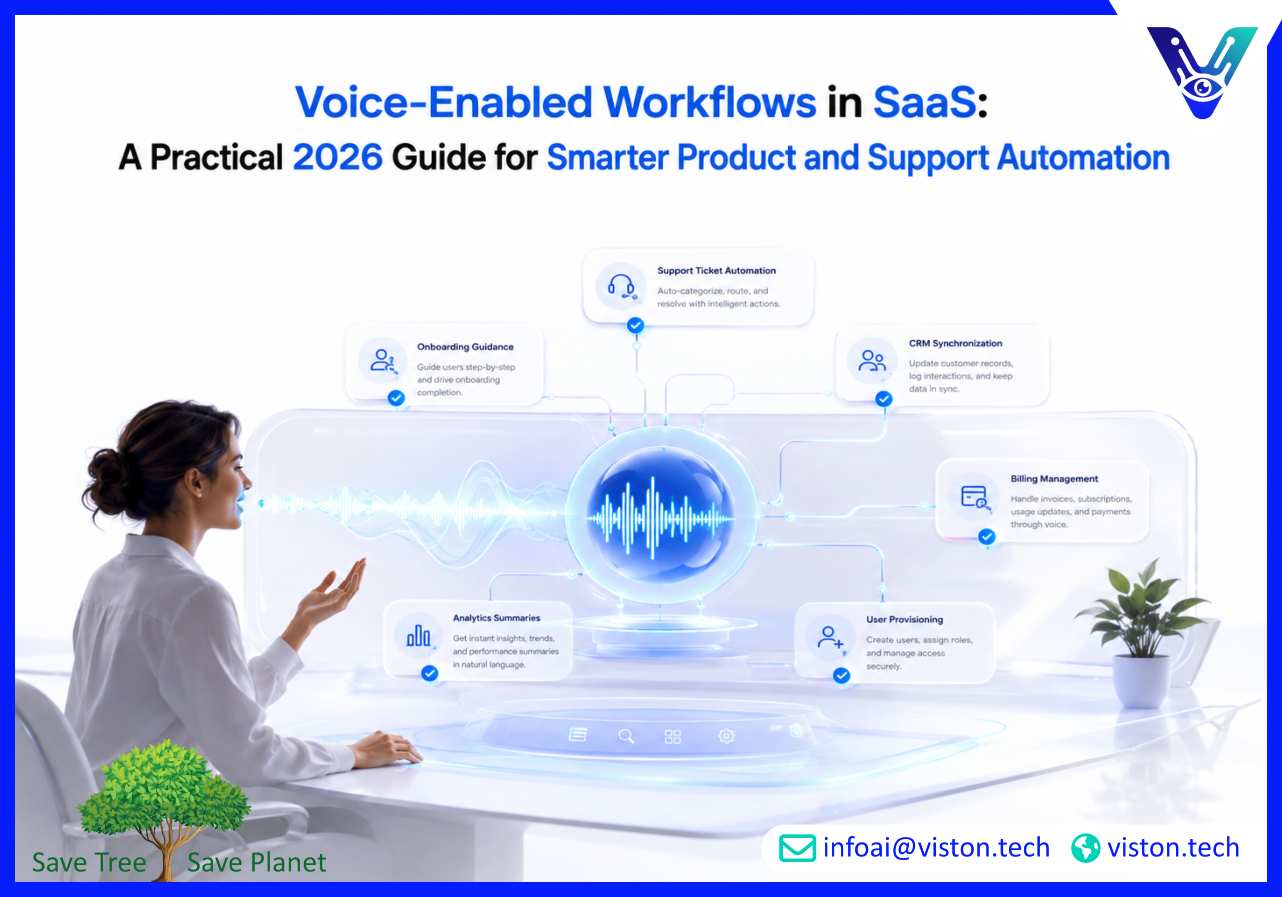
Voice-Enabled Workflows in SaaS: A Practical 2026 Guide for Smarter Product and Support Automation
Voice-enabled workflows in SaaS are becoming a practical way to reduce friction across support, onboarding, product use, and internal operations. For SaaS companies, Voice-Enabled Assistants can help users complete tasks faster, access help naturally, and move through digital workflows without relying only on forms, menus, or tickets.
What Voice-Enabled Workflows in SaaS Mean for Businesses
Voice-enabled workflows in SaaS refer to software processes that users can start, navigate, or complete through spoken interaction. Instead of clicking through multiple screens, typing long requests, or searching a help center, a customer, employee, or account user can speak naturally and receive a guided response or trigger an action inside the SaaS platform.These workflows are powered by Voice-Enabled Assistants that combine automatic speech recognition, natural language understanding, dialogue management, text-to-speech, business logic, and system integration. In a SaaS environment, the assistant must do more than understand words. It must understand product context, user permissions, account status, subscription rules, support history, and the workflow the user is trying to complete.For example, a SaaS user might say, “Show me why my invoice changed,” “Create a support ticket for this integration issue,” “Add three users to my workspace,” or “Walk me through setting up the dashboard.” A well-designed voice workflow can interpret the request, ask clarifying questions, retrieve relevant data, trigger the correct backend action, and confirm the result.
Common SaaS workflows that can become voice-enabled
User onboarding and product walkthroughs
Customer support triage and ticket creation
Billing, subscription, and account management
CRM updates and sales follow-up tasks
Feature discovery and in-app guidance
Internal helpdesk and employee self-service
Analytics summaries and report generation
Admin tasks such as user provisioning and permission changes
The value is not simply that users can speak instead of type. The real value comes when the voice assistant is connected to the SaaS product’s workflows, data, permissions, and support systems. Without integration, voice becomes only a conversational layer. With integration, it becomes an operational interface.
Why Voice-Enabled Workflows Matter for SaaS in 2026
In 2026, SaaS buyers expect software to be easier to adopt, faster to navigate, and more responsive to user intent. Product teams are under pressure to reduce churn, shorten onboarding time, improve feature adoption, and deliver better support without increasing manual headcount at the same rate as customer growth.Voice-enabled workflows help address these challenges by making software interaction more natural. They are especially useful when users need guidance, when workflows have multiple steps, or when typing is inconvenient. For SaaS platforms used by field teams, healthcare staff, logistics operators, sales representatives, finance teams, or busy managers, voice can reduce the burden of screen-heavy interaction.
They reduce friction in complex SaaS products
Many SaaS platforms become more powerful over time but also more complex. Users may struggle to find settings, understand reports, configure integrations, or complete admin tasks. A voice-enabled assistant can guide users through the correct path, explain options in plain language, and help them complete the workflow without leaving the product experience.
They improve self-service support
SaaS support teams often receive repeated questions about login issues, billing, feature setup, integrations, user roles, data imports, and reporting. Voice-enabled support workflows can answer common questions, collect diagnostic details, create tickets, suggest knowledge base articles, and escalate to human support when needed. This improves response speed while preserving human attention for complex issues.
They support accessibility and hands-free use
Voice interaction can make SaaS products more accessible for users who prefer spoken guidance or have difficulty navigating dense interfaces. It also supports hands-free use cases, such as warehouse operations, field inspections, healthcare intake, service dispatch, and mobile workforce management. For SaaS companies serving operational teams, this can become a meaningful product differentiator.
They create a more active product experience
Traditional SaaS interfaces often require users to know where to click. Voice-enabled workflows allow users to describe what they want to accomplish. This shifts the product experience from menu navigation to intent-based assistance. For product-led growth teams, this can improve activation, reduce support dependency, and help users discover more value from the platform.
How Voice-Enabled Assistants Power SaaS Workflows
A production-ready voice workflow depends on several connected capabilities. The assistant must listen accurately, understand intent, manage conversation context, access approved data, trigger actions, and respond clearly. In SaaS, it must also respect user roles, account permissions, subscription limits, and security rules.
Speech recognition and natural language understanding
The workflow begins when the system converts spoken language into text. Strong speech recognition is important because SaaS users may mention product names, technical terms, account IDs, feature labels, or integration tools. Natural language understanding then identifies the user’s intent, extracts useful entities, and determines whether the assistant has enough information to proceed.For example, “Export last month’s usage report for the enterprise plan” requires the assistant to identify the action, date range, report type, and account context. If any information is missing, the assistant should ask a focused follow-up question rather than guessing.
Dialogue management and workflow state
SaaS workflows often involve multiple steps. A user may start with a broad request, add details, change their mind, or ask a related question. Dialogue management helps the assistant remember what has already been discussed and continue the workflow coherently.This is essential for tasks such as onboarding setup, integration troubleshooting, plan upgrades, data imports, or permission configuration. The assistant should know which step the user is on, what information has already been collected, what remains unresolved, and when the workflow should move to human support.
Business system integration
Voice-enabled workflows become useful when they connect to SaaS systems of record. This may include CRM platforms, helpdesk tools, billing systems, product analytics, knowledge bases, identity management, data warehouses, and internal admin tools. Integration allows the assistant to retrieve information, update records, create tasks, trigger notifications, and complete workflow actions.For example, a customer success manager could ask a voice assistant to summarize account health, list open support issues, and create a follow-up task in the CRM. A customer could ask the assistant to check subscription status, explain usage limits, or open a ticket with the correct diagnostic details attached.
Security, permissions, and auditability
SaaS voice workflows must be designed with strong access control. Not every user should be able to perform every action by voice. Admin tasks, billing changes, data exports, account deletions, and permission updates should require authentication, role validation, confirmation steps, and audit logs.Voice assistants should also apply data minimization, encryption, consent management, retention controls, and escalation rules where appropriate. For SaaS companies serving regulated industries, these controls are not optional. They are part of making voice automation safe enough for business use.
Best Practices for Building Voice-Enabled SaaS Workflows
The best voice-enabled workflows are not built by adding voice to every feature. They are designed around high-value moments where spoken interaction reduces effort, improves accuracy, or speeds up completion. SaaS teams should begin with specific use cases and expand only after validating performance.
Start with workflow intent, not technology
Before choosing tools or models, define the business workflow clearly. What task should the user complete? Who is the user? What systems are involved? What permissions apply? What information is required? What does success look like? These answers shape the design of the assistant.Good early candidates include support intake, onboarding guidance, report requests, account lookup, ticket status, meeting preparation, CRM updates, and internal knowledge search. These workflows usually have clear inputs, measurable outcomes, and strong business value.
Design for confirmation and error recovery
Voice interactions can fail if the assistant misunderstands a command, misses a detail, or proceeds without enough confidence. SaaS workflows should include confirmation points for sensitive actions and easy correction paths for routine tasks.For example, before changing a billing plan, the assistant should repeat the requested change and ask for confirmation. If a user says, “No, I meant the annual plan,” the assistant should repair the workflow without forcing the user to restart.
Connect voice workflows to analytics
Performance measurement is essential. SaaS teams should track completion rate, fallback rate, escalation rate, average resolution time, user satisfaction, workflow success, intent accuracy, and the percentage of actions completed without manual intervention. Product teams should also analyze which voice workflows drive activation, retention, support deflection, or customer success efficiency.Voice analytics can reveal where users are confused, which product features need better guidance, and which workflows should be simplified inside the core interface.
Keep humans in the loop where judgment matters
Not every SaaS workflow should be fully automated. Enterprise contract questions, complex technical failures, compliance-sensitive requests, cancellation risk, refund disputes, and high-value account issues may require human judgment. A strong voice assistant should know when to escalate and should pass the full conversation context to the right team.This makes the human handoff smoother and prevents users from repeating themselves. It also helps support, sales, and customer success teams respond with better context.
How Viston AI Supports Voice-Enabled Workflows in SaaS
Viston AI is relevant to voice-enabled workflows in SaaS because its Voice-Enabled Assistants service focuses on building enterprise-grade conversational systems that combine speech recognition, natural language processing, generative AI, and operational infrastructure. For SaaS companies, this combination matters because voice workflows need to understand product-specific language, manage multi-turn conversations, and connect with the systems that power customer and internal operations.Viston AI’s broader AI service capabilities include AI chatbot and virtual assistant development, voice-enabled assistants, multilingual support, business system integration, automation workflows, NLP, LLMOps, model monitoring, and strategic AI consulting. These capabilities align with the practical needs of SaaS teams that want voice assistants to support onboarding, customer support, product navigation, internal helpdesk automation, CRM workflows, and account management.A SaaS company evaluating voice automation should look for more than a voice interface. It needs secure integrations, analytics, workflow design, escalation logic, language support, and ongoing optimization. Viston AI’s service positioning supports this type of implementation by connecting conversational AI with enterprise systems and measurable business outcomes. For SaaS businesses serving global or multi-region customers, its multilingual and integration-focused approach can also help create more consistent user experiences across markets, teams, and product environments.
Frequently Asked Questions
What are voice-enabled workflows in SaaS?
Voice-enabled workflows in SaaS are software processes that users can complete through spoken interaction. They use Voice-Enabled Assistants to understand requests, guide users, retrieve data, trigger actions, and complete tasks inside SaaS products or connected business systems.
Which SaaS workflows are best suited for voice automation?
Good candidates include onboarding guidance, support triage, ticket creation, billing questions, report requests, CRM updates, product navigation, internal helpdesk tasks, account summaries, and hands-free operational workflows. The best use cases are repetitive, high-volume, and connected to clear business outcomes.
How do Voice-Enabled Assistants improve SaaS customer support?
They can answer common questions, collect issue details, create support tickets, retrieve account context, suggest knowledge base content, and route complex issues to human agents. This helps reduce repetitive support workload while improving response speed and consistency.
Are voice-enabled SaaS workflows secure?
They can be secure when designed with authentication, role-based permissions, encryption, consent controls, audit logs, confirmation steps, and clear escalation rules. Sensitive actions such as billing changes, data exports, or admin updates should always include verification and access control.
Can voice workflows help with SaaS product adoption?
Yes. Voice workflows can guide users through setup, explain features, answer product questions, and help users complete tasks without searching documentation. This can improve onboarding, reduce confusion, and support higher feature adoption.
Can Viston AI build voice-enabled workflows for SaaS platforms?
Viston AI’s Voice-Enabled Assistants service is aligned with SaaS workflow automation because it combines voice interaction, NLP, business system integration, multilingual support, analytics, and ongoing optimization for conversational AI experiences.
Conclusion
Voice-enabled workflows in SaaS are becoming a practical way to make software easier to use, faster to navigate, and more responsive to real user intent. When supported by well-designed Voice-Enabled Assistants, SaaS companies can improve onboarding, customer support, product adoption, account management, and internal operations. The key is to treat voice as part of the workflow architecture, not as a standalone feature. Businesses should focus on clear use cases, secure integrations, measurable outcomes, and thoughtful escalation. Viston AI offers relevant capabilities for SaaS teams that want voice automation built around practical workflows, enterprise reliability, and long-term optimization.