
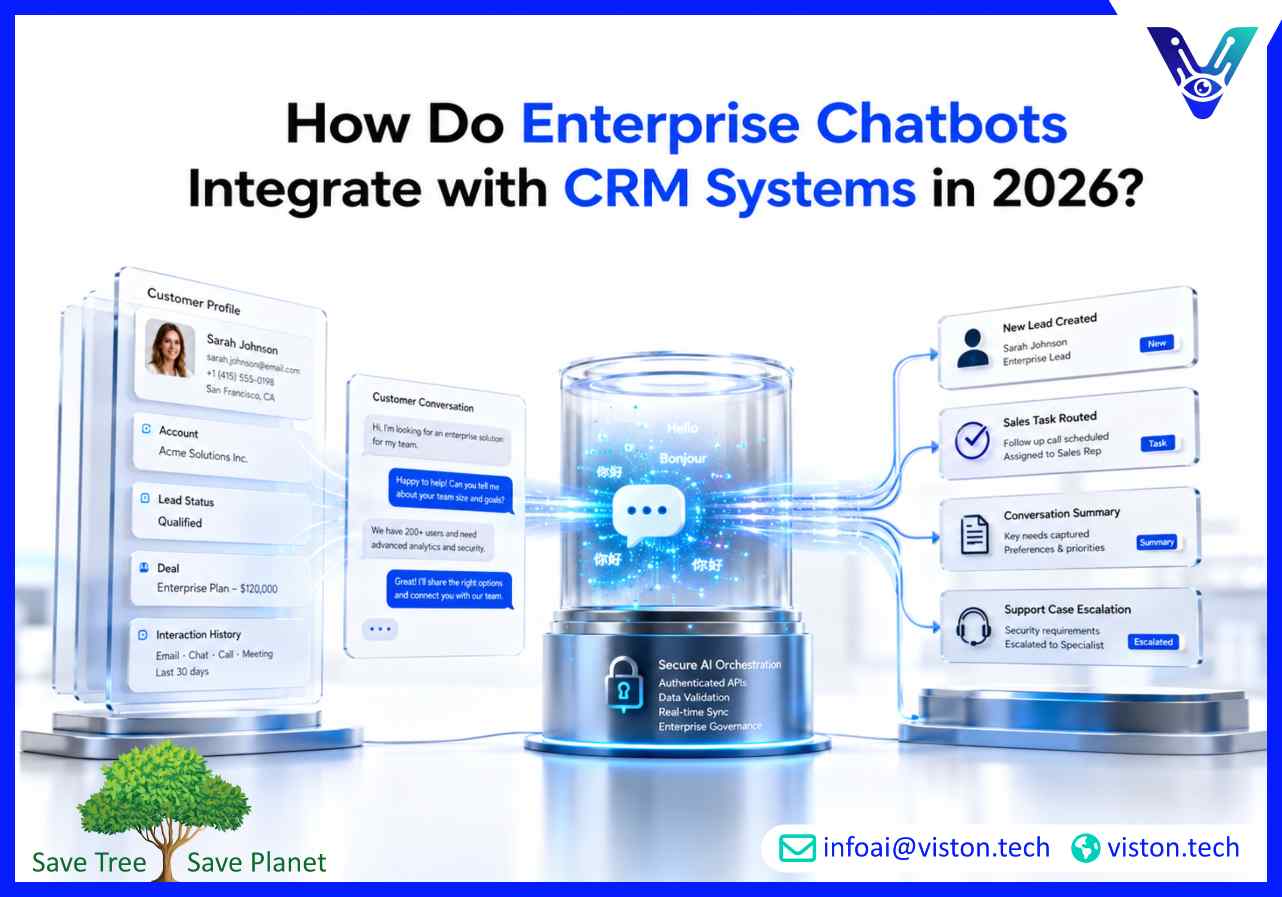
Understanding how enterprise chatbots integrate with CRM systems is essential for businesses that want conversational AI to support real sales, service, and customer operations instead of working as a disconnected website widget.
Enterprise chatbot CRM integration is the process of connecting an AI chatbot with a customer relationship management system so both tools can exchange data, trigger workflows, and support customer-facing teams in real time. Instead of only answering general questions, the chatbot can access approved customer records, create new leads, update contact information, log conversations, assign tasks, and route requests to the right team.
For enterprise AI chatbots, CRM integration is especially important because customer conversations often involve more than simple FAQs. A prospect may ask for pricing, request a demo, share company details, ask about an existing quote, or return after a previous conversation. A customer may need order support, renewal guidance, account updates, complaint handling, or product recommendations. Without CRM access, the chatbot cannot understand the customer’s history or update the business record after the interaction.
In 2026, businesses expect chatbots to work across websites, mobile apps, WhatsApp, live chat, email, customer portals, and internal service channels. CRM integration helps unify those conversations. It gives sales, marketing, support, and account teams a shared view of what happened, what the customer wanted, and what action should happen next.
A chatbot can manage the conversation, but the CRM holds the customer context. Integration allows the chatbot to read and write information where business teams already work. This may include contact details, company records, lifecycle stage, deal status, support history, previous purchases, lead source, account owner, consent status, and open tasks.
The goal is not to expose every CRM field to the chatbot. The goal is to give the chatbot controlled access to the right information at the right time. A well-designed integration improves customer experience while protecting data quality, security, and operational consistency.
Enterprise chatbots usually connect with CRM systems through secure APIs, native connectors, middleware, workflow automation platforms, webhooks, or custom integration layers. The right method depends on the CRM platform, the chatbot architecture, the required workflow, data sensitivity, and whether the business uses cloud, on-premises, or hybrid systems.
API integration is one of the most common approaches. The chatbot sends a request to the CRM through an authenticated API, receives the required data, and uses that data to continue the conversation. For example, a chatbot may check whether a customer email already exists in the CRM, retrieve the account owner, create a lead, or update a ticket-related note.
API-based integration is flexible because it can support custom logic, field mapping, permission controls, and real-time updates. It is also useful for enterprises that need advanced workflows across CRM, helpdesk, ERP, billing, and marketing automation systems.
Some chatbot platforms offer ready-made connectors for CRM systems such as Salesforce, HubSpot, Microsoft Dynamics, Zoho CRM, or other enterprise platforms. These connectors reduce implementation time by providing prebuilt authentication, standard object mapping, and common actions such as lead creation, contact lookup, deal update, or task assignment.
Native connectors are useful for standard use cases, but enterprise teams should still review data structure, validation rules, custom objects, security policies, and workflow requirements. A connector may make the first connection easier, but the business logic still needs careful design.
Middleware tools can sit between the chatbot and CRM to manage workflows across multiple systems. This is useful when a chatbot needs to update the CRM, create a support ticket, notify a sales team, send an email, enrich a lead, or trigger an approval process at the same time.
Middleware also helps when enterprises use several tools that do not communicate cleanly with each other. Instead of hardcoding every connection inside the chatbot, the integration layer can manage routing, retries, logging, transformation, and monitoring.
Webhooks allow real-time event-based communication. When a user submits information through the chatbot, a webhook can send that data to the CRM or another business system. When a CRM event happens, such as a lead status change or case update, a webhook can notify the chatbot or trigger a follow-up sequence.
This approach is useful for time-sensitive workflows such as demo booking, abandoned lead follow-up, escalation alerts, customer onboarding, renewal reminders, and service case updates.
The business value of enterprise chatbot CRM integration comes from the workflows it enables. A chatbot should not simply collect information. It should help teams move customer conversations into structured business actions.
A CRM-connected chatbot can ask relevant qualification questions, capture contact details, identify company size, understand business needs, record budget range, confirm timeline, and assign the lead to the right sales owner. Instead of sending unstructured chat transcripts to sales teams, the chatbot can create clean CRM records with mapped fields.
This improves lead handling because sales teams can prioritize high-intent prospects and avoid wasting time on incomplete inquiries. It also helps marketing teams understand which pages, campaigns, and channels generate qualified conversations.
When a returning customer interacts with the chatbot, CRM integration can help identify existing records. The chatbot may confirm the user’s email, match the account, check permissions, and personalize the response based on approved CRM data.
This is valuable for customer support, account management, renewals, onboarding, and B2B sales. A customer does not need to repeat basic information if the chatbot can securely recognize the account and continue from the existing business context.
Every important chatbot interaction should be recorded in the CRM or connected customer system. Conversation logging helps sales and support teams understand what the customer asked, what answer was provided, what action was taken, and whether follow-up is required.
Good logging does not mean saving every unnecessary message. The chatbot should create useful summaries, tags, intent labels, timestamps, lead source information, escalation notes, and next-step recommendations. This keeps the CRM usable instead of cluttered.
Enterprise chatbots can automatically create follow-up tasks when a prospect requests pricing, asks for a proposal, books a meeting, or shows buying intent. The integration can route the task based on territory, account owner, product interest, language, industry, company size, or priority level.
This reduces missed opportunities and helps sales operations maintain consistent follow-up processes. It also creates accountability because every chatbot-generated opportunity is visible in the CRM pipeline.
For customer service teams, CRM integration can help the chatbot create cases, attach conversation summaries, update contact details, check service level rules, and escalate urgent issues. When human agents receive the case, they can see the context instead of asking the customer to start again.
This is especially important for enterprise environments where customers expect fast, informed, and consistent support across multiple channels.
CRM integration adds business value, but it also introduces responsibility. Enterprise chatbots handle customer information, sales data, service history, and sometimes sensitive account details. Poor integration design can create duplicate records, inaccurate updates, access control problems, compliance exposure, or broken workflows.
The chatbot should only access CRM data that is necessary for the use case. Enterprise teams should apply authentication, authorization, role-based access, token management, API gateway protection, and audit logging. Sensitive workflows may require user verification before the chatbot retrieves or updates account-specific information.
For example, a chatbot may be allowed to create a new lead without authentication, but it should not reveal account status, contract details, or billing information without proper identity confirmation.
CRM data quality depends on clear field mapping. The chatbot must know which conversation answers belong in which CRM fields. It should validate email addresses, phone numbers, company names, product interests, regions, consent status, and required fields before submitting data.
Without validation, chatbots can create duplicate contacts, incomplete leads, incorrect deal values, or unusable support cases. Data governance should be part of chatbot integration from the beginning.
Not every CRM-related conversation should be automated. Enterprise chatbots should escalate when confidence is low, sentiment is negative, the request is sensitive, the customer is high value, or the workflow requires approval. The CRM should receive the full context so the human team can continue smoothly.
Strong handoff design includes conversation history, detected intent, customer identity, CRM record link, attempted resolution, urgency level, and recommended next action.
CRM integration should be tested with real workflow scenarios before launch. Teams should test lead creation, duplicate handling, contact matching, API failures, permission errors, required field validation, task routing, case creation, and escalation triggers.
After launch, businesses should monitor CRM update accuracy, workflow success rate, chatbot fallback rate, escalation quality, lead conversion, case resolution time, and user satisfaction. These metrics show whether the chatbot is improving business operations or creating hidden cleanup work.
Viston AI is relevant to this topic because its Enterprise AI Chatbots service focuses on conversational AI designed for business complexity, including customer interactions across channels, languages, and business units. Its service positioning includes chatbot integration with CRM systems, knowledge bases, and transactional systems to support resolution quality, customer experience, and operational efficiency.
For organizations exploring how enterprise chatbots integrate with CRM systems, this matters because the chatbot must work with existing business infrastructure rather than sit outside it. Viston AI’s AI Chatbot Integration service describes enterprise-grade connectivity with CRM, ERP, and core business platforms, including real-time data synchronization, automated workflows, and unified customer experiences.
Its published capabilities include CRM synchronization, workflow automation, business system integration, natural language understanding, knowledge integration, multi-channel orchestration, security controls, and support for platforms such as Salesforce, HubSpot, Microsoft Dynamics, ServiceNow, SAP, Oracle, and NetSuite.
This makes Viston AI a relevant specialist for businesses that want enterprise AI chatbots to support lead capture, CRM updates, sales routing, customer support escalation, knowledge retrieval, and workflow automation. For growing B2B teams, customer service operations, sales departments, ecommerce businesses, and service-led organizations, a CRM-integrated chatbot can help reduce manual follow-up, improve customer context, and create cleaner operational reporting.
Enterprise chatbots integrate with CRM systems through APIs, native connectors, middleware, webhooks, and custom integration layers. These connections allow the chatbot to read customer data, create leads, update records, log conversations, trigger tasks, and escalate requests to the right team.
A chatbot can access approved CRM data such as contact records, account details, lead status, deal stage, owner information, support history, previous interactions, and customer preferences. Access should be limited by permissions, security rules, and the specific business use case.
Yes. A CRM-integrated chatbot can collect prospect information, qualify the lead, validate required fields, create a CRM record, assign the lead to a sales owner, and trigger follow-up tasks or notifications automatically.
CRM integration helps enterprise AI chatbots move beyond basic answers. It allows the chatbot to personalize conversations, update business records, support sales workflows, improve handoffs, reduce manual data entry, and connect customer interactions to measurable business outcomes.
Poor integration can create duplicate records, inaccurate customer data, broken workflows, missed follow-ups, privacy risks, weak handoffs, and unreliable reporting. Enterprises should plan field mapping, access control, validation, testing, monitoring, and governance before deployment.
Yes. Viston AI’s Enterprise AI Chatbots and AI Chatbot Integration services are aligned with CRM-connected chatbot use cases, including real-time CRM synchronization, lead handling, workflow automation, business system integration, and multi-channel customer engagement.
Understanding how enterprise chatbots integrate with CRM systems helps businesses design conversational AI that supports real operations, not just front-end chat. A CRM-connected chatbot can capture leads, personalize support, update customer records, create tasks, improve handoffs, and give teams better visibility into customer intent. In 2026, enterprise AI chatbots should be evaluated by how well they connect conversations to business systems, workflows, security standards, and measurable outcomes. Viston AI offers relevant capabilities for organizations that want enterprise chatbot deployments connected to CRM systems and broader operational platforms.
