
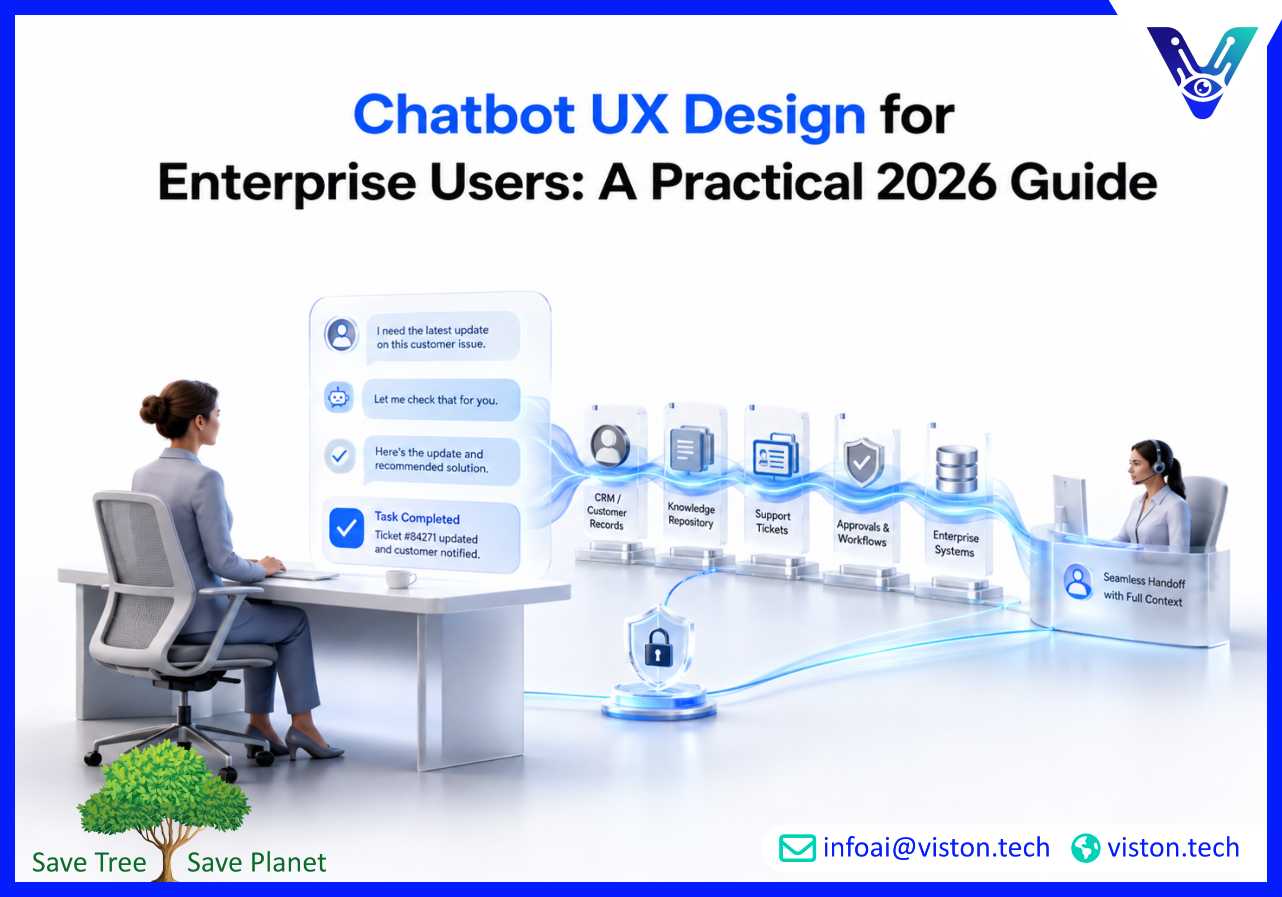
Chatbot UX design for enterprise users matters because business teams need more than quick answers. They need reliable, secure, contextual, and workflow-ready conversations that help them complete real tasks without confusion, repetition, or unnecessary escalation.
Chatbot UX design for enterprise users is the process of designing conversational experiences that fit the way employees, customers, partners, and operations teams actually work inside complex organizations. It is not limited to message wording or chatbot appearance. It includes conversation structure, role-based access, task completion paths, handoff design, data retrieval, accessibility, security, integrations, and performance feedback.
For enterprise environments, chatbot UX must support high-value workflows such as customer support, HR service requests, IT helpdesk assistance, sales enablement, internal knowledge search, compliance guidance, procurement support, onboarding, field operations, and account management. These users are often trying to solve time-sensitive problems, access trusted information, or trigger business processes. A weak chatbot experience can slow teams down, damage trust, and increase support workload instead of reducing it.
In 2026, enterprise chatbot expectations are shaped by generative AI, retrieval-augmented generation, workflow automation, omnichannel support, and stronger governance requirements. Users expect chatbots to understand intent, remember context within a session, explain next steps clearly, and know when to involve a human. Enterprise leaders expect the chatbot to be measurable, secure, compliant, scalable, and connected to systems such as CRM, ERP, helpdesk platforms, knowledge bases, document repositories, HR systems, and analytics tools.
Good enterprise chatbot UX balances automation with control. The chatbot should make work easier, but it should not hide uncertainty, invent answers, or push users through rigid scripts when their needs are complex. The experience must feel guided, transparent, and practical.
The main goal is not simply to create a natural conversation. The goal is to help users complete tasks accurately and efficiently. A well-designed chatbot UX helps users:
This is why Enterprise AI Chatbots must be designed around real user journeys, not only technical capabilities.
Many enterprise chatbot projects fail because the experience is designed around generic questions instead of business workflows. A chatbot may answer basic FAQs, but enterprise users often need deeper help. They may need to compare policies, retrieve customer records, update a ticket, generate a report, check inventory, or understand whether a request requires approval.
When a chatbot lacks workflow context, users quickly lose confidence. They ask a question, receive a vague answer, and then return to email, spreadsheets, portals, or human support. This creates the opposite of the intended outcome. Instead of improving productivity, the chatbot becomes another interface users must work around.
Enterprise chatbot UX usually breaks down in several predictable areas. The first is unclear intent capture. If the chatbot does not understand whether the user wants information, action, status, troubleshooting, or escalation, the conversation becomes frustrating.
The second issue is poor knowledge grounding. Enterprise users need answers from approved documents, internal systems, or current records. If responses are generic or outdated, the chatbot cannot be trusted for operational decisions.
The third issue is weak handoff. When the chatbot transfers a conversation to a human agent without summary, user details, attempted actions, or relevant records, the user has to repeat everything. This damages the experience and increases agent workload.
The fourth issue is over-automation. Not every enterprise interaction should be automated end to end. Sensitive, complex, emotional, regulated, or high-risk situations often require human review. Good UX makes escalation visible and easy.
In consumer chatbots, a friendly tone may be enough to encourage engagement. In enterprise settings, users need confidence signals. They want to know where the answer came from, whether the data is current, whether the chatbot can take action, and what happens next.
Useful confidence signals include source references, last-updated indicators, confirmation screens before system changes, clear limits on what the chatbot can do, and visible escalation options. These elements make the chatbot feel safer and more accountable.
Strong chatbot UX design for enterprise users starts with the business process. Before building conversation flows, teams should identify who will use the chatbot, what decisions they need to make, what systems are involved, what data is sensitive, and where human support remains necessary.
Enterprise users are not all the same. A customer service agent, sales manager, HR employee, finance approver, procurement lead, and field technician may use the same chatbot for very different purposes. The chatbot experience should reflect user roles, permissions, departments, and workflow responsibilities.
Role-aware UX helps prevent irrelevant answers, unauthorized data access, and unnecessary steps. For example, a sales user may need account notes and lead qualification prompts, while a support user may need ticket history and troubleshooting guidance. The interface should adapt to the user’s context without exposing information they should not see.
Enterprise users usually approach a chatbot with a task in mind. The opening message should not be overly broad or decorative. It should communicate what the chatbot can help with and provide clear starting options. Suggested prompts, task buttons, and examples can reduce uncertainty and help users form better questions.
A strong first interaction might guide users toward actions such as “Search policy documents,” “Create a support ticket,” “Check order status,” “Ask about customer account,” or “Escalate to a specialist.” This is more effective than asking users to guess what the chatbot understands.
Enterprise processes can be technical, but chatbot UX should still be easy to follow. The chatbot should avoid long paragraphs, unclear system messages, and excessive jargon unless the user’s role requires it. When a workflow has multiple steps, the chatbot should explain progress clearly.
For example, instead of saying “Your request is being processed,” a better enterprise UX might say, “I found the customer record, checked the open tickets, and created a priority support case. The support team will see the conversation summary and customer ID.” This gives users clarity and trust.
Human handoff should not be treated as failure. In enterprise chatbot UX, it is part of responsible service design. The chatbot should escalate when confidence is low, when the request involves sensitive judgment, when a user is frustrated, or when policy requires human approval.
A good handoff includes conversation history, detected intent, user identity, account information, completed steps, unresolved issue, and recommended next action. This reduces repeat questioning and helps human teams respond faster.
Enterprise chatbot UX should be accessible across devices, languages, abilities, and work environments. Accessibility includes keyboard navigation, readable contrast, screen reader compatibility, clear error messages, simple interaction patterns, and support for users who may not express questions in perfect wording.
Multilingual support is also important for global organizations. A chatbot that supports multiple languages should preserve accuracy, not only translate words. It should understand local terminology, business context, and escalation rules.
Chatbot UX design does not end at launch. Enterprise AI Chatbots need continuous testing, analytics, and optimization because business processes, user expectations, policies, products, and knowledge bases change over time.
Before full deployment, teams should test the chatbot with real users from different roles and departments. Testing should include common tasks, edge cases, unclear questions, permission-based scenarios, handoff situations, and mobile or remote work conditions.
The goal is to understand where users hesitate, abandon the conversation, repeat themselves, or lose trust. These signals often reveal UX problems that technical testing misses.
Enterprise chatbot analytics should measure more than conversation volume. Useful UX metrics include task completion rate, fallback rate, escalation quality, average steps to resolution, repeated question rate, user satisfaction, first contact resolution, and workflow success rate.
For internal chatbots, teams should also monitor employee adoption, time saved, search success rate, knowledge article usefulness, and reduction in repetitive service requests. For customer-facing enterprise chatbots, teams should track conversion assistance, ticket deflection, customer satisfaction, and handoff outcomes.
Failed conversations are one of the best sources of UX improvement. They show where users are confused, where the chatbot lacks content, where integrations fail, and where wording needs refinement. Reviewing failures can help teams improve intent classification, prompts, knowledge retrieval, conversation structure, and escalation logic.
Enterprise chatbot UX must stay aligned with governance. As chatbots become more capable, businesses need clear controls for approved knowledge sources, data handling, role-based access, audit logs, compliance review, response quality, and model behavior. Good governance improves UX because users trust systems that are predictable, transparent, and properly controlled.
Viston AI is relevant to chatbot UX design for enterprise users because its Enterprise AI Chatbots service focuses on building conversational AI for complex business environments rather than simple scripted bots. Its service offering includes enterprise chatbot development, natural language understanding, multi-turn dialogue management, workflow automation, multilingual support, voice-enabled assistants, and integration with business systems such as CRM platforms, knowledge bases, transactional tools, and operational systems.
For enterprises, this matters because UX quality depends on how well the chatbot understands context, retrieves reliable information, completes tasks, and supports handoff when automation is not enough. A chatbot that is not connected to enterprise data cannot provide a useful enterprise experience. Viston AI’s integration-focused approach helps businesses design chatbot experiences that connect conversation flow with real workflows, customer records, support processes, and internal knowledge.
The company’s broader AI service capabilities, including AI strategy, readiness assessment, NLP, automation workflows, model monitoring, and responsible AI governance, are also relevant to chatbot UX. These capabilities support practical decisions such as what to automate, how to structure user journeys, how to handle sensitive data, and how to measure performance after launch. For organizations building Enterprise AI Chatbots in 2026, Viston AI can support chatbot UX design that is scalable, secure, business-focused, and aligned with real operational outcomes.
Chatbot UX design for enterprise users is the design of conversational experiences that help employees, customers, and business teams complete tasks inside complex enterprise workflows. It includes conversation flow, intent handling, system integration, accessibility, escalation, security, and measurement.
Enterprise chatbot UX is different because users often need secure access to business data, role-based responses, workflow automation, auditability, and reliable handoff. A regular chatbot may answer FAQs, while an enterprise chatbot must support operational tasks and decision-making.
A good Enterprise AI Chatbot experience is clear, contextual, accurate, accessible, and action-oriented. It understands user intent, uses trusted knowledge, connects with business systems, explains next steps, and escalates smoothly when human support is needed.
Businesses can improve adoption by designing around real workflows, offering useful starter prompts, reducing repetitive steps, integrating with existing tools, training users, measuring task completion, and improving failed conversations after launch.
Yes. Human handoff is essential for complex, sensitive, high-risk, or unresolved interactions. The chatbot should pass full context to the human team so users do not need to repeat information.
Yes. Viston AI’s Enterprise AI Chatbots service aligns with chatbot UX design because it supports conversational AI development, business system integration, workflow automation, multilingual support, and enterprise-focused chatbot delivery.
Chatbot UX design for enterprise users is a critical part of successful Enterprise AI Chatbots in 2026. Businesses need chatbot experiences that are not only conversational but also useful, secure, measurable, and connected to real workflows. Strong UX helps users find trusted answers, complete tasks, reduce manual effort, and move smoothly to human support when needed. The best enterprise chatbot experiences are designed around user roles, workflow context, accessibility, governance, and continuous improvement. For organizations planning scalable chatbot adoption, Viston AI offers relevant Enterprise AI Chatbots expertise that connects chatbot design with practical business outcomes.
