
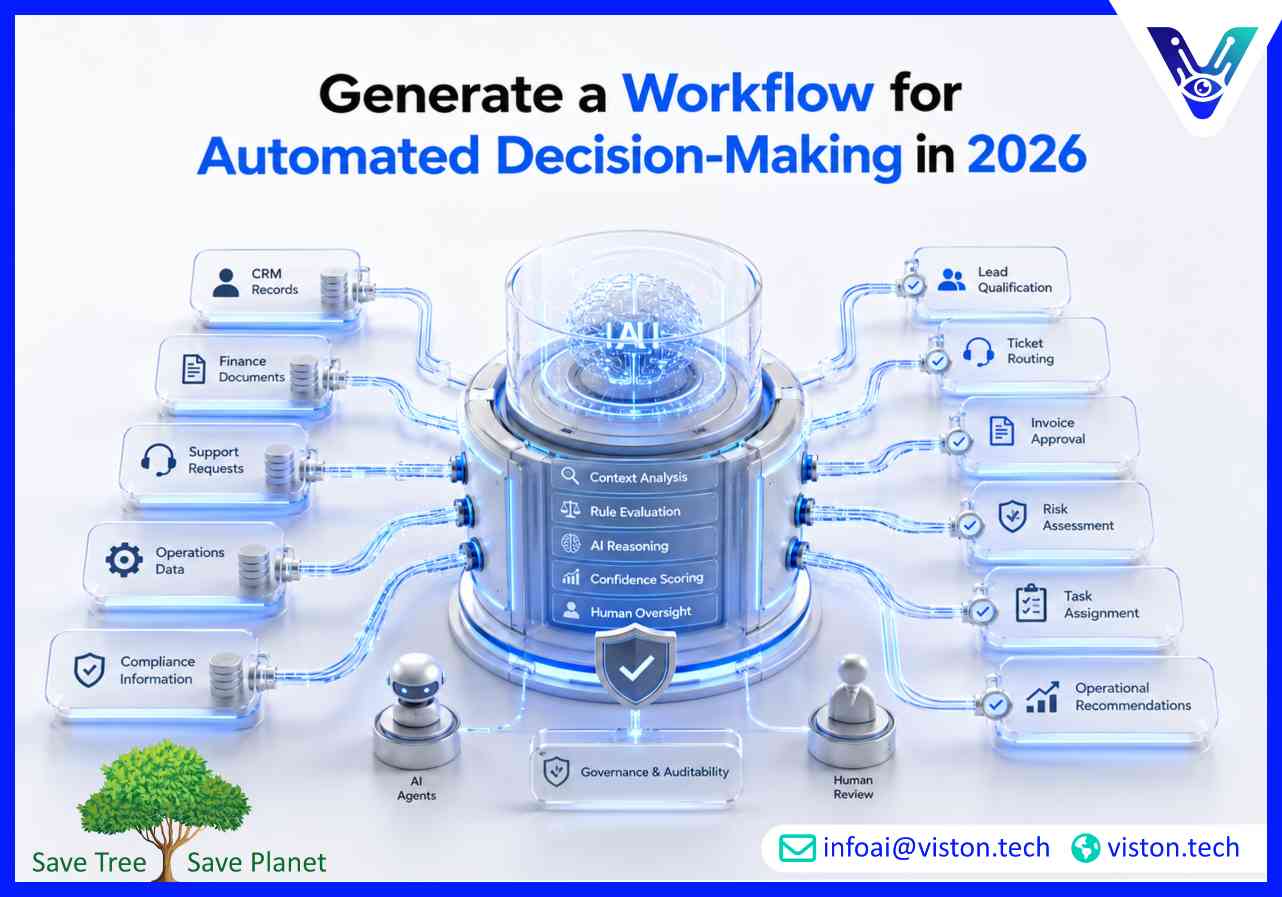
Automated decision-making is becoming essential for businesses that need faster, more consistent, and more scalable operations. With agentic AI workflows, companies can move beyond static automation and build systems that analyze context, evaluate options, trigger actions, and escalate decisions when human judgment is required.
An automated decision-making workflow is a structured process where software systems, AI models, business rules, data sources, and human approval points work together to make or support decisions. In a traditional workflow, automation usually follows fixed instructions. In an agentic AI workflow, the system can interpret goals, review changing information, select the next action, and coordinate tasks across tools.
This matters because many business decisions are repetitive but still require context. Examples include lead qualification, support ticket routing, invoice approval, fraud detection, inventory alerts, employee onboarding checks, compliance review, and customer risk scoring. These decisions are often too frequent for manual teams to handle efficiently, yet too important to automate without control.
A strong automated decision-making workflow does not simply replace people. It gives teams a reliable decision layer that improves speed, consistency, documentation, and operational visibility. The best workflows combine AI reasoning with defined guardrails, approval thresholds, audit logs, and continuous performance monitoring.
In 2026, businesses expect automation systems to be more adaptive, explainable, secure, and integrated. Static rule-based automation is still useful, but it often struggles when data is incomplete, customer behavior changes, or decisions require multiple systems. Agentic AI workflows help address this by using AI agents that can interpret inputs, retrieve information, compare options, and recommend or execute actions based on defined objectives.
For example, a sales operations workflow may review CRM data, score a lead, check recent engagement, identify the best follow-up action, draft a personalized message, and assign the task to the right sales representative. A finance workflow may compare invoice details against purchase orders, detect exceptions, request missing information, and escalate high-risk approvals to a manager.
The value comes from combining automation with decision intelligence. Businesses can reduce delays, improve quality control, and support teams with faster access to relevant insights. However, responsible design is critical. Automated decisions must be governed by clear business logic, model evaluation, data validation, privacy controls, and human oversight for high-impact outcomes.
Start by identifying the exact decision the workflow should support. A vague goal such as “automate operations” is too broad. A better goal is “automatically classify inbound support tickets by urgency, customer value, product category, and required department.” Clear decision goals make the workflow easier to design, test, and improve.
Automated decision-making depends on reliable data. Identify the systems the workflow needs, such as CRM platforms, ERP software, helpdesk tools, data warehouses, customer databases, email platforms, analytics tools, payment systems, or internal knowledge bases. The workflow should only use data that is accurate, permissioned, relevant, and current.
Not every decision should be left entirely to AI. The most reliable workflows combine deterministic business rules with AI reasoning. Rules handle fixed conditions, while AI agents handle interpretation, classification, summarization, recommendation, and exception analysis.
A decision workflow should know when not to act. Confidence scoring helps determine whether the system can complete an action automatically or must escalate it. For example, a customer support agent may auto-route a ticket when confidence is high, but send it to a supervisor when the issue is unclear or emotionally sensitive.
Once the decision is made, the workflow should trigger the right action. This may include updating a CRM record, sending a notification, creating a task, approving a request, generating a report, assigning a case, drafting an email, or escalating an exception. Integrations are essential because decision-making only creates value when it connects to execution.
Automated decision-making should be measured continuously. Businesses should monitor decision accuracy, processing time, escalation rate, user overrides, compliance exceptions, customer impact, and operational cost savings. This helps teams refine prompts, rules, data sources, approval thresholds, and model behavior over time.
A reliable agentic AI workflow for automated decision-making usually includes several connected layers. The first layer is data intake, where information enters the system from forms, emails, APIs, databases, documents, or business applications. The second layer is analysis, where AI agents classify, summarize, score, or interpret the data.
The third layer is decision logic. This includes business rules, risk thresholds, model outputs, confidence levels, and policy requirements. The fourth layer is action orchestration, where the workflow executes approved actions across connected systems. The fifth layer is governance, which includes audit trails, approval logs, access controls, monitoring, and fallback procedures.
For business use, governance is not optional. A workflow that makes decisions without traceability can create operational, legal, reputational, and compliance risks. Leaders should ensure that every automated decision can be reviewed, explained, corrected, and improved.
A practical architecture may include:
Agentic AI workflows can review inbound leads, score buying intent, enrich company data, identify priority accounts, recommend follow-up actions, and assign leads to the right team. This helps sales teams respond faster and focus on higher-value opportunities.
Support teams can use automated decision-making to classify tickets, detect urgency, identify customer sentiment, suggest resolutions, and escalate complex cases. This improves response speed while keeping human agents involved where empathy or judgment is needed.
Finance workflows can validate invoices, compare payment requests against policies, flag anomalies, and route approvals based on amount, department, vendor risk, or missing documentation. This reduces manual review time and improves control.
Operations teams can automate decisions related to inventory alerts, workflow prioritization, resource allocation, supplier issues, and internal task routing. The result is faster coordination and fewer process bottlenecks.
Decision workflows can support risk scoring, document checks, compliance monitoring, exception detection, and policy enforcement. For sensitive areas, human approval and auditability should remain central to the workflow design.
An automated decision-making workflow is a structured system that uses data, business rules, AI models, and integrations to make or support decisions with minimal manual effort.
Agentic AI workflows improve decision-making by analyzing context, retrieving relevant information, planning actions, coordinating tools, and escalating uncertain cases to humans.
It can replace low-risk repetitive approvals, but human oversight should remain for sensitive, high-value, regulated, or uncertain decisions.
Common integrations include CRM, ERP, helpdesk, finance platforms, email systems, data warehouses, analytics tools, internal databases, and API-based applications.
Reliability depends on clean data, clear decision rules, confidence thresholds, human review points, security controls, audit logs, and continuous monitoring.
To generate a workflow for automated decision-making, businesses need more than a simple automation script. They need a structured agentic AI workflow that combines data, reasoning, business rules, integrations, oversight, and measurable outcomes. In 2026, the most effective decision workflows are adaptive but controlled, fast but auditable, and intelligent but accountable. Organizations that design these systems carefully can reduce manual work, improve consistency, and make better operational decisions at scale.
